
In the previous article we got our AS Blue 65001 operating as we want it, now we crank up the complexity with a more complex example which is more like you’d find or want to architect in real world scenario. Previously our AS Blue 65001 only had a single exit point to AS Green 65002, so traffic could only go one way when it was leaving this AS. However you’d want to have some resilience both in terms of a router failing, but also in terms of a link failing, so we’re going to add some extra routes and links to allow us to really understand some different approaches.
As you can see in our topology, we have added two new Routers, Router D and Router H (both in AS Green), we’ve also added another link between AS Blue and AS Green. With this topology we’ll now be able to explore multiple exit points and other techniques for manipulating the traffic flow between two points on the network.
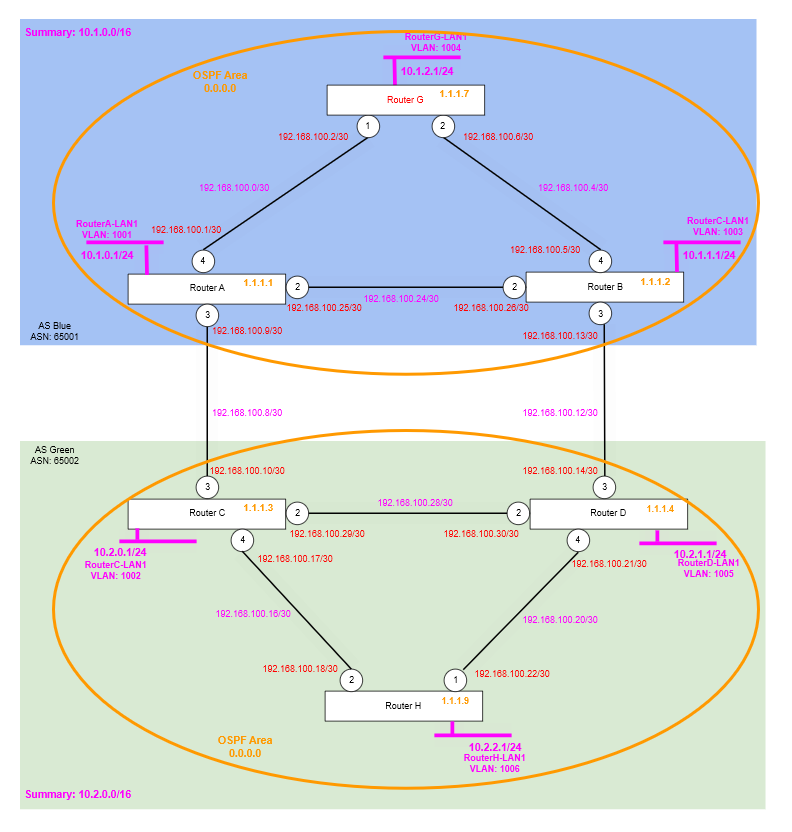
The configuration steps will also be much more brief from now on, with less explaination of what is being added, and focussing on the actual key parts of the article’s partifulcar topic.
Step 1 – Configure New Routers and Links
We’re going to configure the new routers, their links and their BGP configuration. We are also going to be setting up AS Green (65002) to use an IGP (OSPF) as well, a completely separate Area which will help distribute routes around the AS needed to support the BGP configuration. And as before the BGP configuration will make use of the loopback IP addresses for BGP Neighbours (peers) within the AS and the interface IPs for the BGP Neighbours (peers) between the AS.
Router B
create vlan "RB-RD"
configure vlan "RB-RD" ipaddress 192.168.100.13/30
enable ipforwarding vlan "RB-RD"
configure vlan "RB-RD" add port 3 untagged

create bgp neighbor 192.168.100.14 remote-AS-number 65002
configure bgp neighbor 192.168.100.14 source-interface ipaddress 192.168.100.13
enable bgp neighbor 192.168.100.14

configure ospf add vlan RB-RD area 0.0.0.0 passive
Router C
create vlan "RC-RD"
configure vlan "RC-RD" ipaddress 192.168.100.29/30
enable ipforwarding vlan "RC-RD"
configure vlan "RC-RD" add port 2 untagged

create vlan "RC-RH"
configure vlan "RC-RH" ipaddress 192.168.100.17/30
enable ipforwarding vlan "RC-RH"
configure vlan "RC-RH" add port 4 untagged

create bgp neighbor 1.1.1.4 remote-AS-number 65002
configure bgp neighbor 1.1.1.4 source-interface ipaddress 1.1.1.3
enable bgp neighbor 1.1.1.4

create bgp neighbor 1.1.1.9 remote-AS-number 65002
configure bgp neighbor 1.1.1.9 source-interface ipaddress 1.1.1.3
enable bgp neighbor 1.1.1.9

configure ospf routerid 1.1.1.3
enable ospf
configure ospf add vlan RC-RA area 0.0.0.0 passive
configure ospf add vlan RC-RD area 0.0.0.0 link-type point-to-point
configure ospf add vlan RC-RH area 0.0.0.0 link-type point-to-point
configure ospf add vlan RouterC-LP area 0.0.0.0 passive
Note: that although OSPF is being enabled on the interface going to Router A (in the other AS), we are not using OSPF for the exchange of any routes between the two AS, we don’t need to and if we did this would defeat the point of using BGP in the first place! OSPF is only there to move the routes needed as the underlay network around within the AS to support the use of BGP (specifically iBGP).
Router D
create vlan "RD-RB"
configure vlan "RD-RB" ipaddress 192.168.100.14/30
enable ipforwarding vlan "RD-RB"
configure vlan "RD-RB" add port 3 untagged

create vlan "RD-RC"
configure vlan "RD-RC" ipaddress 192.168.100.30/30
enable ipforwarding vlan "RD-RC"
configure vlan "RD-RC" add port 2 untagged

create vlan "RD-RH"
configure vlan "RD-RH" ipaddress 192.168.100.21/30
enable ipforwarding vlan "RD-RH"
configure vlan "RD-RH" add port 4 untagged

create vlan "RouterD-LP"
configure vlan RouterD-LP tag 1114
enable loopback-mode vlan RouterD-LP
configure vlan RouterD-LP ipaddress 1.1.1.4 255.255.255.255
enable ipforwarding vlan RouterD-LP

create vlan "RouterD-LAN1" tag 1005
configure vlan "RouterD-LAN1" ipaddress 10.2.1.1/24
enable ipforwarding "RouterD-LAN1"
enable loopback-mode vlan "RouterD-LAN1"

configure bgp AS-number 65002
configure bgp routerid 1.1.1.4
enable bgp

create bgp neighbor 192.168.100.13 remote-AS-number 65001
configure bgp neighbor 192.168.100.13 source-interface ipaddress 192.168.100.14
enable bgp neighbor 192.168.100.13

create bgp neighbor 1.1.1.3 remote-AS-number 65002
configure bgp neighbor 1.1.1.3 source-interface ipaddress 1.1.1.4
enable bgp neighbor 1.1.1.3

create bgp neighbor 1.1.1.9 remote-AS-number 65002
configure bgp neighbor 1.1.1.9 source-interface ipaddress 1.1.1.4
enable bgp neighbor 1.1.1.9

configure bgp add network 10.2.1.0/24

configure ospf routerid 1.1.1.4
enable ospf
configure ospf add vlan RD-RB area 0.0.0.0 passive
configure ospf add vlan RD-RC area 0.0.0.0 link-type point-to-point
configure ospf add vlan RD-RH area 0.0.0.0 link-type point-to-point
configure ospf add vlan RouterD-LP area 0.0.0.0 passive
Note: that although OSPF is being enabled on the interface going to Router A (in the other AS), we are not using OSPF for the exchange of any routes between the two AS, we don’t need to and if we did this would defeat the point of using BGP in the first place! OSPF is only there to move the routes needed as the underlay network around within the AS to support the use of BGP (specifically iBGP).
Router H
create vlan "RH-RC"
configure vlan "RH-RC" ipaddress 192.168.100.18/30
enable ipforwarding vlan "RH-RC"
configure vlan "RH-RC" add port 2 untagged

create vlan "RH-RD"
configure vlan "RH-RD" ipaddress 192.168.100.22/30
enable ipforwarding vlan "RH-RD"
configure vlan "RH-RD" add port 1 untagged

create vlan "RouterH-LP"
configure vlan RouterH-LP tag 1119
enable loopback-mode vlan RouterH-LP
configure vlan RouterH-LP ipaddress 1.1.1.9 255.255.255.255
enable ipforwarding vlan RouterH-LP

create vlan "RouterH-LAN1" tag 1006
configure vlan "RouterH-LAN1" ipaddress 10.2.2.1/24
enable ipforwarding "RouterH-LAN1"
enable loopback-mode vlan "RouterH-LAN1"

configure bgp AS-number 65002
configure bgp routerid 1.1.1.9
enable bgp

create bgp neighbor 1.1.1.3 remote-AS-number 65002
configure bgp neighbor 1.1.1.3 source-interface ipaddress 1.1.1.9
enable bgp neighbor 1.1.1.3

create bgp neighbor 1.1.1.4 remote-AS-number 65002
configure bgp neighbor 1.1.1.4 source-interface ipaddress 1.1.1.9
enable bgp neighbor 1.1.1.4

configure bgp add network 10.2.2.0/24

configure ospf routerid 1.1.1.9
enable ospf
configure ospf add vlan RH-RC area 0.0.0.0 link-type point-to-point
configure ospf add vlan RH-RD area 0.0.0.0 link-type point-to-point
configure ospf add vlan RouterH-LP area 0.0.0.0 passive
With the environment ready, we can now work through some tests and further configuration.
Step 2 – Verify
We need to verify that OSPF is working on the AS Green (65002) Autonomous System, we’re using OSPF to carry around the routes for the underlying network, that needed by iBGP. We then need to verify BGP neighbour (peers) are all working as expected. Then finally we can do some connection tests.
OSPF
Run the following on each of the Routers in AS Green, so Router C, Router D and Router H, and ensure each has a FULL session with the other two routers.
* tris-routerH.77 # show ospf neighbor
Neighbor ID     Pri State              Up/Dead Time             Address         Interface
          BFD Session State
==========================================================================================
1.1.1.3           1 FULL      /DROTHER 00:00:18:28/00:00:00:04  192.168.100.17  RH-RC
          None

1.1.1.4           1 FULL      /DROTHER 00:00:18:28/00:00:00:05  192.168.100.21  RH-RD
          None

Total number of neighbors: 2 (All neighbors in Full state)
Remember both ends will show as DROTHER because we’ve configured point-to-point links, which means there are no DR or BDR.
BGP
Run the following on each of the Routers in AS Green, so Router C, Router D and Router H, and ensure each has an ESTABLISHED session with the other two routers. And on Router C and Router D, it should also have an eBGP session to Router A and Router B (respectively) in the other AS (AS Blue).
* tris-routerH.79 # show bgp neighbor

     Peer            AS         Weight State        InMsgs OutMsgs(InQ)  Up/Down
-----------------------------------------------------------------------------------
Ie-- 1.1.1.3         65002      1      ESTABLISHED  31     27    (0    ) 0:0:22:14
Ie-- 1.1.1.4         65002      1      ESTABLISHED  29     28    (0    ) 0:0:22:43

Flags: (d) disabled, (e) enabled, (E) external peer, (I) internal peer
       (m) EBGP multihop, (r) route reflector client

BGP Peer Statistics
  Total Peers       : 2
  EBGP Peers        : 0                 IBGP Peers          : 2
  RR Client         : 0                 EBGP Multihop       : 0
  Enabled           : 2                 Disabled            : 0
Connectivity Test
Now let’s perform a test. We’ll ping from RouterG-LAN1 VLAN interface (10.1.2.1) to the RouterH-LAN1 VLAN interface (10.2.2.1), we should find this works fine, because Router G will have learnt the route to RouterH-LAN1 (10.2.2.0/24) from either Router A or Router B (infact both), and these will have learnt the routes from either Router C or Router D (infact both), which in turn would have learnt this route from Router H itself; all via BGP.
* tris-routerG.1 # ping 10.2.2.1 from 10.1.2.1
Ping(ICMP) 10.2.2.1: 4 packets, 8 data bytes, interval 1 second(s).
16 bytes from 10.2.2.1: icmp_seq=0 ttl=62 time=1.297 ms
16 bytes from 10.2.2.1: icmp_seq=1 ttl=62 time=1.062 ms
16 bytes from 10.2.2.1: icmp_seq=2 ttl=62 time=1.014 ms
16 bytes from 10.2.2.1: icmp_seq=3 ttl=62 time=1.043 ms

--- 10.2.2.1 ping statistics ---
4 packets transmitted, 4 packets received, 0% loss
round-trip min/avg/max = 1/1/1 ms
Then let’s run a traceroute to see which way the traffic is going across the network.
* tris-routerG.2 # traceroute 10.2.2.1 from 10.1.2.1
traceroute to 10.2.2.1, 30 hops max
 1  192.168.100.1                                5 ms        4 ms        3 ms
 2  192.168.100.10                               0 ms        0 ms        0 ms
 3  10.2.2.1                                     1 ms        4 ms        0 ms

--- Packet Response/Error Flags ---
 (*) No response, (!N) ICMP network unreachable, (!H) ICMP host unreachable,
 (!P) ICMP protocol unreachable, (!F) ICMP fragmentation needed,
 (!S) ICMP source route failed, (!u) Transmit error, network unreachable,
 (!f) Transmit error, fragmentation needed, (!t) General transmit error
Examining the network diagram, we can see that the traffic is going from: Router G → Router A (192.168.100.1) → Router C (192.168.100.10) → Router H (10.2.2.1).
Examine Route Tables
If we now check the route tables on the AS Green, we should see lots of routes showing, notice we should not be seeing any OSPF routes for the point to point links between routers in AS Blue when viewed from AS Green (and vice versa); these OSPF routes are only for within the AS and are only there to facilitate the underlying infrastructure that BGP depends on, namely the Loopback addresses.
Checking on Router H, we can see the routes labeled with “bi” are the ones learnt via iBGP, from the local AS (Green), but also from the remote AS (Blue).
* tris-routerH.80 # show iproute
Ori  Destination        Gateway         Mtr  Flags         VLAN       Duration
#oa  1.1.1.3/32         192.168.100.17  12   UG-D---um--f- RH-RC      0d:0h:31m:33s
#oa  1.1.1.4/32         192.168.100.21  12   UG-D---um--f- RH-RD      0d:0h:31m:28s
#d   1.1.1.9/32         1.1.1.9         1    U------um--f- RouterH-LP 0d:0h:36m:45s
#bi  10.1.0.0/24        192.168.100.17  1    UG-D---um--f- RH-RC      0d:0h:11m:1s
#bi  10.1.1.0/24        192.168.100.17  1    UG-D---um--f- RH-RC      0d:0h:11m:1s
#bi  10.1.2.0/24        192.168.100.17  1    UG-D---um--f- RH-RC      0d:0h:11m:1s
#bi  10.2.0.0/24        192.168.100.17  0    UG-D---um--f- RH-RC      0d:0h:30m:14s
#bi  10.2.1.0/24        192.168.100.21  0    UG-D---um--f- RH-RD      0d:0h:19m:28s
#d   10.2.2.0/24        10.2.2.1        1    U------um--f- RouterH-LAN1 0d:0h:36m:39s
#oa  192.168.100.8/30   192.168.100.17  4    UG-D---um--f- RH-RC      0d:0h:11m:33s
#oa  192.168.100.12/30  192.168.100.21  4    UG-D---um--f- RH-RD      0d:0h:31m:28s
#d   192.168.100.16/30  192.168.100.18  1    U------um--f- RH-RC      0d:0h:33m:18s
#d   192.168.100.20/30  192.168.100.22  1    U------um--f- RH-RD      0d:0h:33m:13s
#oa  192.168.100.28/30  192.168.100.17  4    UG-D---um--f- RH-RC      0d:0h:31m:33s
#oa  192.168.100.28/30  192.168.100.21  4    UG-D---um---- RH-RD      0d:0h:31m:28s

       (mo) MOSPF (o) OSPF, (o1) OSPFExt1, (o2) OSPFExt2,
       (oa) OSPFIntra, (oe) OSPFAsExt, (or) OSPFInter, (pd) PIM-DM, (ps) PIM-SM,
       (r) RIP, (ra) RtAdvrt, (s) Static, (sv) SLB_VIP, (hm) Host-mobility, (un) UnKnown,
       (*) Preferred unicast route (@) Preferred multicast route,
       (#) Preferred unicast and multicast route.

Flags: (b) BFD protection requested, (B) BlackHole, (c) Compressed, (D) Dynamic,
       (f) Provided to FIB, (G) Gateway, (H) Host Route,
       (I) ICMP ping protection requested, (l) Calculated LDP LSP,
       (L) Matching LDP LSP, (m) Multicast, (p) BFD protection active,
       (P) LPM-routing, (R) Modified, (s) Static LSP, (S) Static,
       (t) Calculated RSVP-TE LSP, (T) Matching RSVP-TE LSP, (u) Unicast,
       (U) Up, (3) L3VPN Route.

MPLS Label: (S) Bottom of Label Stack
Mask distribution:
     6 routes at length 24           6 routes at length 30
     3 routes at length 32

Route Origin distribution:
     4 routes from Direct               6 routes from OSPFIntra
     5 routes from IBGP

Total number of routes = 15
Total number of compressed routes = 0
If we then check the BGP routes, we see something interesting and expected. Looking at Router H, we can see that the networks in AS Blue, i.e. 10.1.0.0/16, so within that 10.1.0.0/24, 10.1.1.0/24 and 10.1.2.0/24 are all showing up with two routes, which makes sense. Router H has two routes to these networks via Router C and Router D.
We’ll explore this in more detail in the next step.
Step 3 – Link Failure Router C to Router A
Previous to this most recent configuration, if the link between Router C and Router A were to fail, the connectivity between the two AS would have been disrupted, now however, with the newly added Router D and its additional links, there exists the posibility for multiple routes through the network, so let’s try this.
We’re going to down the link between Router A and Router C. So previously if RouterG-LAN1 (10.1.2.0/24) wanted to talk to RouterH-LAN1 (10.2.2.0/24) the path would have been: Router G → Router A (192.168.100.1) → Router C (192.168.100.10) → Router H (10.2.2.1). Output is shown below, some content omitted for brevity.
Before Link Failure
* tris-routerG.1 # traceroute 10.2.2.1 from 10.1.2.1
traceroute to 10.2.2.1, 30 hops max
 1  192.168.100.1                                1 ms        1 ms        1 ms
 2  192.168.100.10                               1 ms        5 ms        0 ms
 3  10.2.2.1                                     1 ms        1 ms        1 ms

...
* tris-routerG.2 # show bgp routes all
Routes:
Destination Peer Next-Hop LPref Weight MED AS-Path
----------------------------------------------------------------------------------------
*>i 10.1.0.0/24 1.1.1.1 1.1.1.1 100 1 0
*>i 10.1.1.0/24 1.1.1.2 1.1.1.2 100 1 0
*>i 10.2.0.0/24 1.1.1.1 192.168.100.10 100 1 0 65002
i 10.2.0.0/24 1.1.1.2 192.168.100.14 100 1 0 65002
*>i 10.2.1.0/24 1.1.1.1 192.168.100.10 100 1 0 65002
i 10.2.1.0/24 1.1.1.2 192.168.100.14 100 1 0 65002
*>i 10.2.2.0/24 1.1.1.1 192.168.100.10 100 1 0 65002
i 10.2.2.0/24 1.1.1.2 192.168.100.14 100 1 0 65002
Flags: (*) Preferred BGP route, (>) Active, (d) Suppressed, (h) History
(s) Stale, (m) Multipath, (u) Unfeasible
Origin: (?) Incomplete, (e) EGP, (i) IGP
...After Link Failure
* tris-routerG.3 # traceroute 10.2.2.1 from 10.1.2.1
traceroute to 10.2.2.1, 30 hops max
 1  192.168.100.5                                4 ms        5 ms        6 ms
 2  192.168.100.14                               6 ms        0 ms        0 ms
 3  10.2.2.1                                     5 ms        5 ms        0 ms
* tris-routerG.4 # show bgp routes all
Routes:
Destination Peer Next-Hop LPref Weight MED AS-Path
----------------------------------------------------------------------------------------
*>i 10.1.0.0/24 1.1.1.1 1.1.1.1 100 1 0
*>i 10.1.1.0/24 1.1.1.2 1.1.1.2 100 1 0
*>i 10.2.0.0/24 1.1.1.2 192.168.100.14 100 1 0 65002
*>i 10.2.1.0/24 1.1.1.2 192.168.100.14 100 1 0 65002
*>i 10.2.2.0/24 1.1.1.2 192.168.100.14 100 1 0 65002
Flags: (*) Preferred BGP route, (>) Active, (d) Suppressed, (h) History
(s) Stale, (m) Multipath, (u) Unfeasible
Origin: (?) Incomplete, (e) EGP, (i) IGPWe can see now that a different path/route through the network is being taken; and the previously secondary routes in the BGP route table are now the primaries!
Re-enable the link ready for the next article and further testing.
Conclusion
Now we have built some additional configuration into the network, we have what we need to explore how we can manipulate the routing between AS Blue and AS Green.
- Why does the traffic sent from Router G flow via Router A and Router C on its way to Router H?
- Why does it not use Router B and Router D instead, those are both the same number of hops, same Routers, same speed links?
- Why is it when the link between Router A and Router C is unavailable that there are not still two routes, i.e. Router G → Router A → Router B → Router D → Router H, sure its not very direct, but its still another option!
- How can we maniupulate this to what we want it to be?