
Investigation into the loss of Rich Hybrid features for on-premise mailbox users, from around the beginning of November 2025.
Exchange Version
Says we need Exchange Server 2016 CU23 with April 2025 HU 15.1.2507.55, we are currently running 15.1.2507.58, so a later version than the minimum requirement, thus we are good on this version.
Identified Issue
Free/Busy information does not show for on-premise user mailboxes when accessing a cloud mailbox’s calendar, where that cloud mailbox calendar is shared only with AvailabilityOnly or LimitedDetails permissions – i.e. just Free/Busy. It is worth noting that even when provided with Reviewer and/or Editor permissions to the calendar of a cloud mailbox which allows the calendar to be viewed successfully (in Microsoft Outlook (Windows) only), some parts of Outlook/OWA still use Free/Busy information (e.g. Availability Finder) and ignore the extra permissions which still appears to show an issue; additional AppleOS clients using Microsoft Outlook for Mac, which rely on EWS (Exchange Web Services) which is what Outlook Web Access (on-premise) also uses this EWS method, so are also affected.
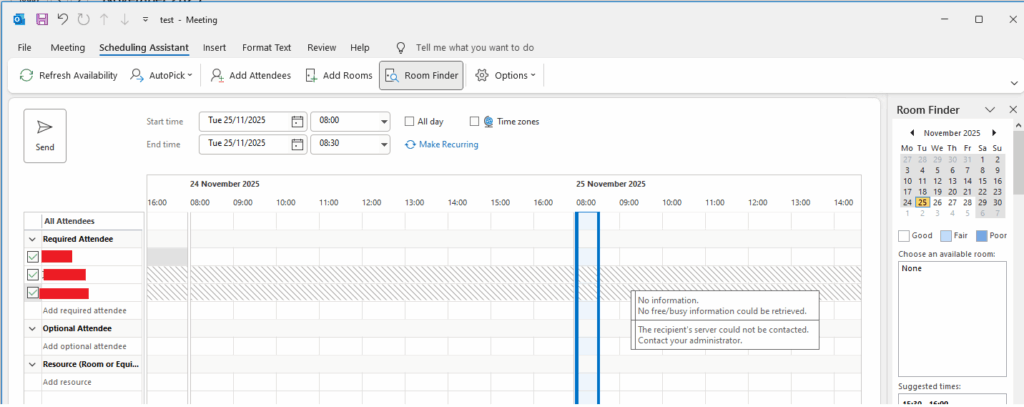
Getting output like this when attempting a test command, the user testuser@domain.com being the local on-premise email mailbox attempting to access free/busy of a calendar in a cloud user’s mailbox.
Test-OAuthConnectivity -Service EWS -TargetUri https://outlook.office365.com/ews/exchange.asmx -Mailbox testuser@domain.com -verbose | fl
RunspaceId  : 1205301b-xc51-451c-a806-a8340a0ced72
Task        : Checking EWS API Call Under Oauth
Detail      : The configuration was last successfully loaded at 26/11/2025 09:00:24 UTC. This was 7 minutes ago.
              The token cache is being cleared because "use cached token" was set to false.
              Exchange Outbound Oauth Log:
...
System.Net.WebException: The remote server returned an error: (403) Forbidden.
On-premise Outlook Web Access was then seeing the following when looking through Developer Tools (F12) of the browser.
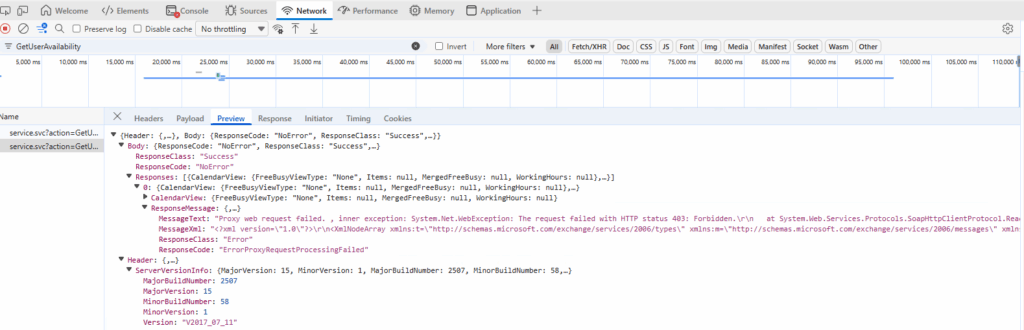
Known to be affecting the following (non-exhaustive list):
- Microsoft Windows – Microsoft Outlook 365 Apps
- Any Platform, Any Browser – Outlook Web Access
- AppleOS – Microsoft Outlook for Mac
A user whose mailbox has been migrated to the cloud and is attempting to access another Cloud mailbox user’s calendar via Free/Busy or Permissioned (i.e. Reviewer or above) does not see this issue. A cloud mailbox user who is attempting to access an on-premise mailbox’s calendar does not see this issue either (using Microsoft Outlook on Windows or Outlook Web Access).
Identified Cause
It appears that although the new Hybrid Application (i.e. ExchangeServerApp-d8dc1e85-1234-492e-7654-17b8f9b52842) has been created within Microsoft 365 (by the Microsoft Hybrid Configuration Wizard) it is showing absolutely no sign ins which should not be the case, if this was in use then the authentications by on-premise Exchange Servers on-behalf of on-premise user’s attempting to access cloud based mailboxes (and calendars directly or via Free/Busy) using clients such as Microsoft Outlook (Windows), Outlook Web Access and Microsoft Outlook (Mac) would appear listed – which they are not.
The Microsoft document: https://techcommunity.microsoft.com/blog/exchange/dedicated-hybrid-app-temporary-enforcements-new-hcw-and-possible-hybrid-function/4440682 details that on 31st October 2025, the legacy Hybrid integration will be changed from using a legacy shared service principal, to a new dedicated Hybrid application; the failure of the legacy method after 31st October 2025, would affect (break) the rich coexistence hybrid features (free/busy availability, MailTips and profile picture sharing) between on-premises hosted and Exchange Online hosted mailboxes.
The investigations have identified that the HCW has installed the new Hybrid application successfully, but it appears that it has not been activated.
The Microsoft document: https://learn.microsoft.com/en-gb/Exchange/hybrid-deployment/deploy-dedicated-hybrid-app details steps that are required, one key step that does not appear to have been completed is the running of the “New-SettingOverride” command as detailed in the section entitled: How to enable the dedicated Exchange hybrid application feature via setting override.
Resolution
From an on-premise Exchange Server with the Exchange Management Shell (EMS) run the following commands as Administrator (Exchange Administrator), this should only need to be run once on one Exchange Server, being that it is a global configuration (stored in Active Directory).
New-SettingOverride -Name "EnableExchangeHybrid3PAppFeature" -Component "Global" -Section "ExchangeOnpremAsThirdPartyAppId" -Parameters @("Enabled=true") -Reason "Enable dedicated Exchange hybrid app feature" Get-ExchangeDiagnosticInfo -Process Microsoft.Exchange.Directory.TopologyService -Component VariantConfiguration -Argument Refresh
Verify its presence with:
Get-SettingOverride
Its unknown how long this will take to apply or if there is a need to run IISRESET across all of the on-premise Microsoft Exchange Servers before the Free/Busy access works once again.
Additionally running the following test should now return a successful result, where “testuser@domain.com” is the email address/UPN of an on-premise user account, (attempting to access a cloud resource).
Test-OAuthConnectivity -Service EWS -TargetUri https://outlook.office365.com/ews/exchange.asmx -Mailbox testuser@domain.com -verbose | fl
At this point it is expected that the Rich Hybrid Features, e.g. Free/Busy will return to service.
After around 15 minutes the Free/Busy started to work again as expected. The Exchange Enterprise Application in Microsoft 365, is now showing service principal sign-ins which it was not before, so that bit appears to be working.

Additionally running the VerifyUpdateSuccess.ps1 script:
$OnPremisesMailbox = "test@domain.com"

$result = Test-OAuthConnectivity -Service EWS -TargetUri https://outlook.office365.com -Mailbox $OnPremisesMailbox
Write-Host $result.ResultType
if (($result.Detail.FullId) -match 'L:(?<guid>[0-9a-fA-F-]{36})-AS:') {
    $appid = $matches['guid']
    Write-Output "Extracted appId: $appid"
} else {
    Write-Output "appId not found"
}
We previously got:
.\VerifyUpdateSuccess.ps1
Error
Extracted appId: 00000002-0000-0ff1-ce00-000000000000
Now we get (note the X’s are to obscure sensitive information)
.\VerifyUpdateSuccess.ps1
Successtate : New
Extracted appId: b7XXXbd1-62a3-XXXX-XXXX-XXXXXc42d496
Additional Information
- https://techcommunity.microsoft.com/blog/exchange/dedicated-hybrid-app-temporary-enforcements-new-hcw-and-possible-hybrid-function/4440682
- https://techcommunity.microsoft.com/blog/exchange/exchange-server-security-changes-for-hybrid-deployments/4396833
- https://learn.microsoft.com/en-gb/Exchange/hybrid-deployment/deploy-dedicated-hybrid-app#how-to-enable-the-dedicated-exchange-hybrid-application-feature-via-setting-override
- https://blog.icewolf.ch/archive/2025/07/14/check-for-hybrid-configuration-wizard-updates/
Thank you! This is exactly our setup and this article helped me resolve it after hours of testing/verifying oauth, re-running HCW countless times, generating new thumbprints/certs, and going down the wrong pathways to try to resolve it. Lifesaver!!