
Border Gateway Protocol (BGP) path selection works out the best path when BGP has routes that it could choose from. There are a number of BGP Attributes which are evaluated (top to bottom) so that the path with the best attribute is selected for the path.
BGP Attributes
There are 11 BGP Attributes, these are used by BGP to determine the “best path”. We’re not going to go into detail here about them, that will come in a later article; however we’re going to quickly review these so you can see what they are, then we’ll explore in this article how two of them, MED and Local Preference can be used.
The key thing to remember is that each attribute has a priority from lowest to highest. When BGP attempts to determine the best path, it goes through the list from top to bottom. If there is a tie, for example you have two possible paths to the same network each with the same Weight, BGP just moves to the next attribute to see if it can determine the best path from the two it has learned.
| Priority | Attribute |
| 1 | Weight |
| 2 | Local Preference (LPref) |
| 3 | Originate |
| 4 | AS path length |
| 5 | Origin code |
| 6 | MED (Multi Exit Discrimator) |
| 7 | eBGP path over iBGP path |
| 8 | Shortest IGP path to BGP next hop |
| 9 | Oldest path |
| 10 | Router ID |
| 11 | Neighbour IP address |
Current Network Topology
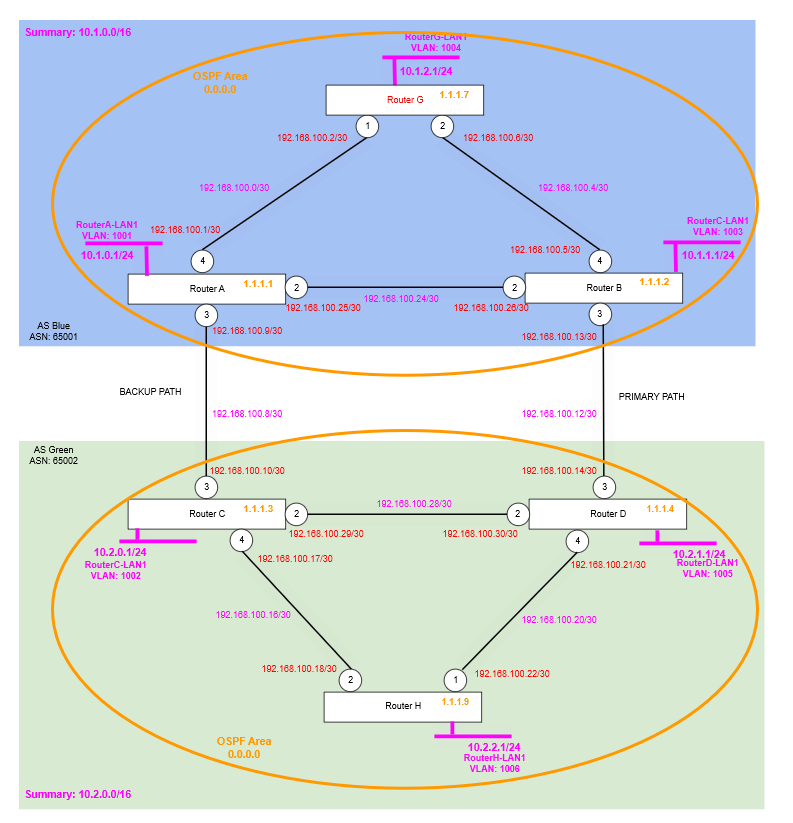
We have the topology from the previous article. Nothing has really changed, but what we have done is stated that we want the link between Router A and Router C to be the “backup” path. And we want the link between Router B and Router D to be the “primary” path.
Currently, however if you were to ping from Router G to the Router H (or vice versa) you’d find that it would favour the “BACKUP PATH”, in this article we’re going to explore techniques to influence and control this routing path to how we want it to work.
Why does it favour the Router A side? (with no specific mechanism to influence)
Although we’ll deep dive into the BGP Attributes in a later article, what we have found is that the network appears to favour the “BACKUP PATH” (Router A ↔ Router C) for some reason. We’ve not yet implemented any kind of techniques to influence or direct traffic in any particular way, so clearly it is using an attribute to determine the “best path” as between Router A and Router C rather than between Router B and Router D.
Let’s have a look on Router G.
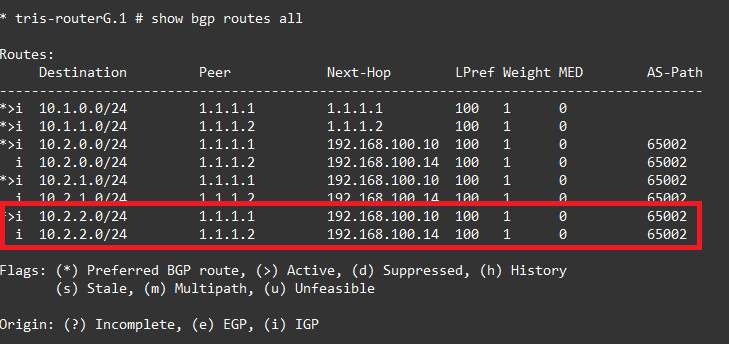
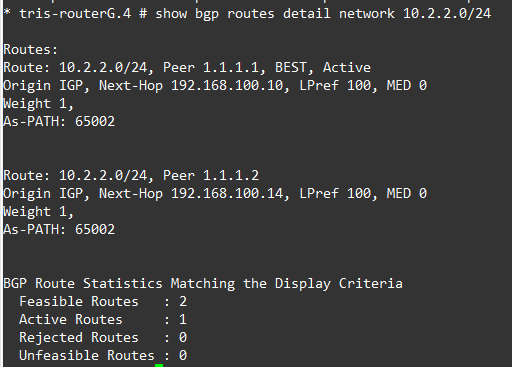
OK, so we’re interested in the route to 10.2.2.0/24 which is hosted on Router G. Let’s step down all the attributes and see if we can figure out how it’s making its decision. So stepping through the list above one by one from the top (first one used to determine):
- Weight – In this case both the routes have the same weight, value of 1, so that’s a tie, moving on…
- Local Preference – Both have the same 100 (we’ve not set this), so that’s a tie, moving on…
- Originate – Neither of the routes have come from (been installed by) this local router (i.e. Router G), so that’s also a tie, moving on…
- AS Path Length – Both paths have only one AS-Path AS listed (65002), so that’s a tie, moving on…
- Origin Code – A bit of a weird one (and more detail in an upcoming article), but in this case these have been learned via IGP (rather than EGP), IGP is preferred over EGP, and EGP is preferred over INCOMPLETE. In this case they are both “i” (IGP), so that’s also a tie, moving on…
- MED – The MED value (which we’ll show in use later) is 0 for both too, so that’s a tie, moving on…
- Oldest Path – The Oldest Path is a very odd one, it doesn’t appear to work the way you’d expect. Firstly, it appears that it only applies to routes learned via eBGP, not via iBGP, in our case on Router G, it is only learning routes via eBGP, thus it appears this is just not used to determine anything. Secondly, during testing, we’ve proven that this attribute isn’t used (for Router G), because otherwise the route/path would stick on Router B ↔ Router D link, if the Router A ↔ Router C link were to fail and then return; but that is not what happens, it just immediately changes the most desirable (best) path back to the one via Router A ↔ Router C, so a further assertion that it “prefers the current” rather than “prefers the oldest” might hold for eBGP (not tested), but doesn’t hold for iBGP which was tested here. Link: bgp-oldest-path – Ergo, this isn’t being used, so moving on…
- Router ID – The Router ID, means the path (from or via) the BGP neighbour router with the lowest Router ID. So in this case the route (path) coming from Router ID 1.1.1.1 (Router A) is lower than the route (path) coming from Router ID 1.1.1.2 (Router B), so this looks to be why Router G is picking the route (path) via Router A ↔ Router C over the other path via Router B ↔ Router D. So this appears to be the deciding attribute, although at this point the evaluation would stop, let’s discuss the last one.
- Neigbour/Neighbor IP Address – Similar to the evaluation of the lowest Router ID attribute (above), the path that has the lowest neighbour IP address would be preferred, if in this case it were to have been used, the Router A ↔ Router C link would have one being 192.168.100.8/30, so 192.168.100.10 at the Router C end (the “next-hop”) from the point of view of Router G. As another bit of information, if we were to have two links between Router A and Router C, the Router ID would be the decider.
Path Selection
There are a number of different options for path selection, the key thing to remember is it is influence rather than command. You don’t own the remote Autonomous System (AS) so we can only attempt to influence the best path selection within their network, they are the owners of it though! We’ll look into these three approaches to see how they work; there are more, but these are the more commonly used ones I’ve seen in use.
- MED Multi Exit Discriminator
- AS Path Prepending
- BGP Communities
So what do we actually want to do? What is the goal?
Well, as we found the traffic going between Router G’s RouterG-LAN1 (10.1.2.0/24) and Router H’s RouterH-LAN1 (10.2.2.0/24) could take a route via Router A or a route via Router B when going from AS Blue 65001 to AS Green 65002. We found it appeared to favour the Router A path (unless that link was unavailable), but what if we wanted it to always use the path via Router B instead? i.e. How can we manipulate (influence) what is the primary, and what is the secondary?
Multi Exit Discriminator (MED)
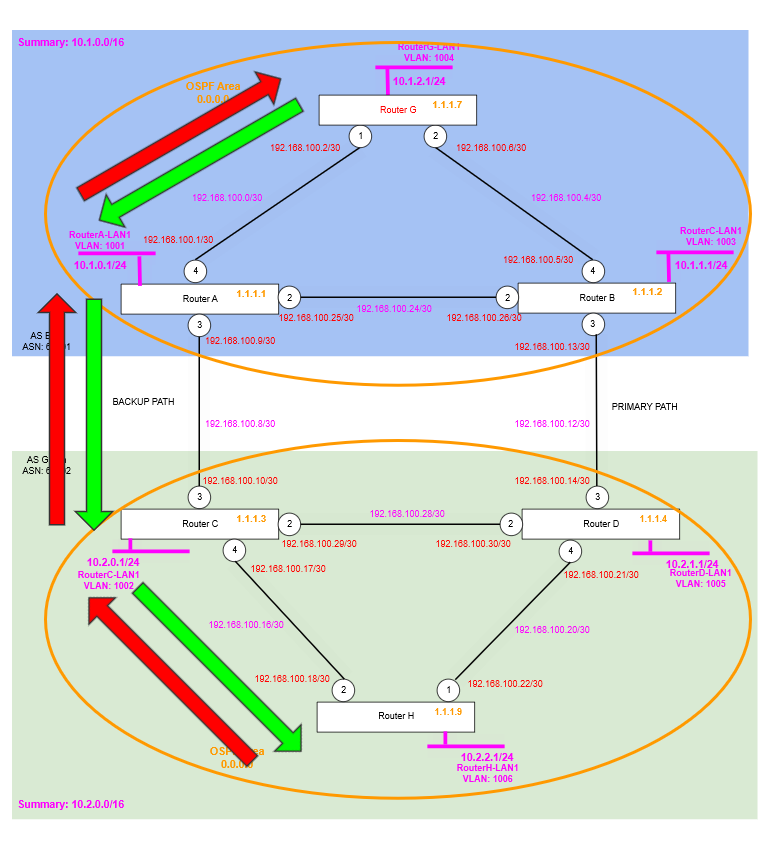
So by default the route from Router G to Router H seems to go via Router A, let’s make it use the route via Router B as the primary, and then the route via Router A as the secondary.
Router A
We want Router A to be the backup route, so give this a higher MED (metric) value.
edit policy BACKUPROUTE-OUTThen add the following content, we are specifying the exact routes/networks we want to have the MED manipulated on. There is also a catch-all, so any other routes will be transmitted, without the MED value changed. If you don’t add the catch-all the routes won’t be transmitted at all; which may or may not be what you want, in our case that is not what we want!
You’ll also notice we’re using the supernet for the AS Blue, summarised to 10.1.0.0/16, this is just so we can ensure that any new routes we might add are also included, without us needing to go back and add it manually to this policy.
entry BACKUPROUTE-OUT {
if match any {
        nlri 10.1.0.0/16;
}
then {
        med add 100;
		permit;
}
}
entry BACKUPROUTEOUT-ALL {
if match any {
}
then {
        permit;
}
}
Check the policy is okay with:
check policy BACKUPROUTE-OUTThen apply it to the BGP Neighbour (peer) configuration between Router A and Router C.
configure bgp neighbor 192.168.100.10 route-policy out BACKUPROUTE-OUTRefresh it with:
refresh policy BACKUPROUTE-OUTRouter B
Now, ideally you’d also add a policy for the MED on Router B, i.e. your second entry/exit point to the AS, but for brevity and clarity we are not. However, if you were, you’d be setting a lower MED, say 50, so the receiving router D in this case, is attempted to be influenced to use this as the preferred ingress point. Whereby with MED the lower the value the more preferable the route.
Local Preference
Also required is a local preference to ensure that the paths are symmetrical.
We can illustrate this by looking at the route tables of Router G and Router H, we should be able to track the same path of intermediate routers between them in each direction, but if we have a look we can see this is not the case.
- Router G’s path between RouterG-LAN1 (10.1.2.0/24) is: Router G → Router A → Router C → Router H.
- Router H’s path to RouterG-LAN1 (10.1.2.0/24) is: Router H → Router D – Router B → Router G.
That’s not what we want, although asymmetric routing can sometimes be useful, we want our path to be more deterministic through the network, in the current situation the traffic going between Router G and Router H (and vice-versa) would take one path outbound leg and another on the inbound leg.
Router G (AS Blue)
* tris-routerG.2 # show bgp routes all

Routes:
     Destination         Peer            Next-Hop        LPref Weight MED        AS-Path
----------------------------------------------------------------------------------------
*>i  10.1.0.0/24         1.1.1.1         1.1.1.1         100   1      0
*>i  10.1.1.0/24         1.1.1.2         1.1.1.2         100   1      0
*>i  10.2.0.0/24         1.1.1.1         192.168.100.10  100   1      0          65002
  i  10.2.0.0/24         1.1.1.2         192.168.100.14  100   1      0          65002
*>i  10.2.1.0/24         1.1.1.1         192.168.100.10  100   1      0          65002
  i  10.2.1.0/24         1.1.1.2         192.168.100.14  100   1      0          65002
*>i  10.2.2.0/24         1.1.1.1         192.168.100.10  100   1      0          65002
  i  10.2.2.0/24         1.1.1.2         192.168.100.14  100   1      0          65002

Flags: (*) Preferred BGP route, (>) Active, (d) Suppressed, (h) History
       (s) Stale, (m) Multipath, (u) Unfeasible

Origin: (?) Incomplete, (e) EGP, (i) IGP
Router H (AS Green)
* tris-routerH.3 # show bgp routes all

Routes:
     Destination         Peer            Next-Hop        LPref Weight MED        AS-Path
----------------------------------------------------------------------------------------
*>i  10.1.0.0/24         1.1.1.4         192.168.100.13  100   1      0          65001
*>i  10.1.1.0/24         1.1.1.4         192.168.100.13  100   1      0          65001
*>i  10.1.2.0/24         1.1.1.4         192.168.100.13  100   1      0          65001
*>i  10.2.0.0/24         1.1.1.3         1.1.1.3         100   1      0
*>i  10.2.1.0/24         1.1.1.4         1.1.1.4         100   1      0

Flags: (*) Preferred BGP route, (>) Active, (d) Suppressed, (h) History
       (s) Stale, (m) Multipath, (u) Unfeasible

Origin: (?) Incomplete, (e) EGP, (i) IGP
To correct this we can use the “Local Preference” to dictate how traffic will leave (egress) an AS.
Where using the MED attempts to influence another AS for ingress to an AS, the Local Preference can be used to dictate within an AS how traffic will egress an AS.
In our example we want that the Router A ↔ Router C link is a backup and the Router B ↔ Router D link is the primary, so we’ll add a policy on the Router A ↔ Router C BGP Neighbour, specifically on the Router A side (AS Blue) as an inbound policy, which will lower the Local Preference, so this route looks less appealing than the route (paths) via Router D; that way we should have a symmetric path outbound and inbound.
Router A – Configuration
Create a new policy as follows and apply on the inbound to the BGP Neighbour (peer).
You’ll also notice we’re using the supernet for the AS Green, summarised to 10.2.0.0/16, this is just so if the administrator of AS Green were to add any new networks, we’d not need to add them manually to the policy. Of course, you may not always be able to do this, but this is where communication between the administrators of each AS becomes important to ensure each other’s configurations “dovetail” as much as possible.
entry BACKUPROUTE-IN {
if match all {
    nlri 10.2.0.0/16 ;
}
then {
    local-preference 50 ;
    permit  ;
}
}
Then apply it to the BGP Neighbour (peer) configuration between Router A and Router C.
configure bgp neighbor 192.168.100.10 route-policy in BACKUPROUTE-INYou may need to refresh with: “refresh policy BACKUPROUTE-IN”, but now if we examine the route table on Router A, we can indeed see that the routes being learned from Router C now have a Local Preference (LPref) applied to them.
In this case the higher the preference the more favourable the route/path, the lower the preference the less favourable the route/path.
* tris-routerA.13 # show bgp routes all

Routes:
     Destination         Peer            Next-Hop        LPref Weight MED        AS-Path
----------------------------------------------------------------------------------------
*>i  10.1.1.0/24         1.1.1.2         1.1.1.2         100   1      0
*>i  10.1.2.0/24         1.1.1.7         1.1.1.7         100   1      0
*>i  10.2.0.0/24         1.1.1.2         192.168.100.14  100   1      0          65002
  i  10.2.0.0/24         192.168.100.10  192.168.100.10  50    1      0          65002
*>i  10.2.1.0/24         1.1.1.2         192.168.100.14  100   1      0          65002
  i  10.2.1.0/24         192.168.100.10  192.168.100.10  50    1      0          65002
*>i  10.2.2.0/24         1.1.1.2         192.168.100.14  100   1      0          65002
  i  10.2.2.0/24         192.168.100.10  192.168.100.10  50    1      0          65002

Flags: (*) Preferred BGP route, (>) Active, (d) Suppressed, (h) History
       (s) Stale, (m) Multipath, (u) Unfeasible

Origin: (?) Incomplete, (e) EGP, (i) IGP
Verify
Okay, so now when we re-examine Router G and Router H’s route tables what do we now see?
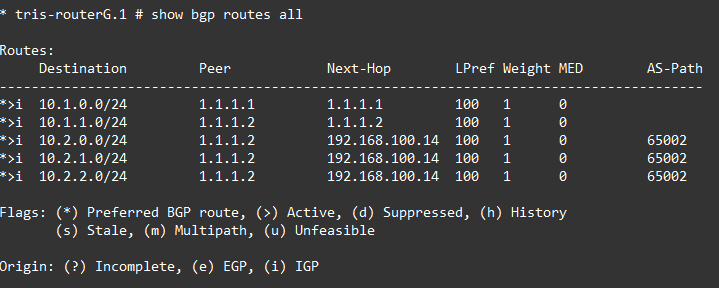
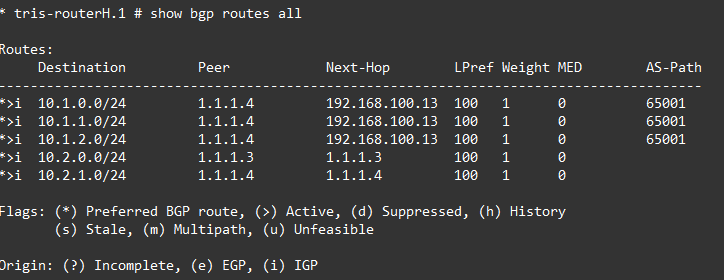
As we can now see Router G and Router H are both showing the same path between themselves, which means we now have symmetric routing in place, using Local Preference to direct egress traffic from AS Blue (65001) to use the link Router C ↔ Router D and then using MED to influence traffic to use the Router C ↔ Router D link when ingressing into AS Blue (65001), from AS Green (65002) in this case.
Conclusion
We’ve seen how MED can be used to attempt to influence the other AS to use the entry point to our network we want others to use. Additionally, we’ve looked at how Local Preference can be used within our own network to control the routing in association with MED to ensure a symmetric routing path.