
We use IaC (Infrastructure as Code) for the deployment and management of all cloud (AWS) workloads to ensure we can manage and update infrastructure and applications that are deployed in the cloud rapidily and on an ongoing basis, while maintaining flexibility, security and availability. However issues may occur when changes are made using automated processes, such as the AWS Firewall Manager to “retrofit” or “enforce” particular configurations on infrastructure/applications that are managed via IaC through Terraform (for example). The issue that can occour is that the Terraform dictates “what we want the world to look like”, if something changes the configration (within scope of the Terraform template) out-of-band of this, it is considered “drift”, and needs to be either expicitly excluded (ignored), imported into Terraform, or instead acknowledged.
Issue
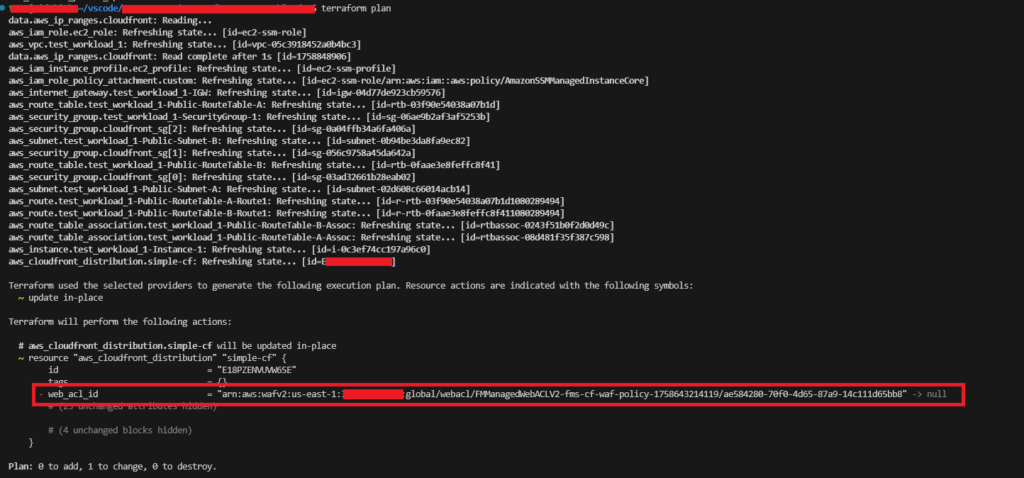
The example we are considering is a workload which uses the AWS CloudFront distribution to publish a web application. An AWS Firewall Manager Policy has been centrally managed and deployed to all CloudFront Distributions within the AWS Organisation. The problem is with this is that this has changed a resource that is within scope of an existing IaC (Terraform) template’s configuration. The implication of this is that because this configuration is missing from the template it is considered a “drift” from the desired configuration as denoted in the Terraform template.
We don’t want to import the FMS-managed Web ACL into the member account’s Terraform. We want to let Firewall Manager (FMS) keep ownership, but in the member account (workload account), just “adopt” the association on the CloudFront resource so Terraform stops trying to remove it; because it thinks it is drift. An example of this if/when it occurs can be found below. As you can see Terraform wants to remove this because its not declared in the template.
Resolution (Recommended)
To resolve the issue we are going to “Adopt” the assocation into our IaC (Terraform).
Step 1 – Determine Name
First determine the “Name” of the WebACL that is being applied to your CloudFront Distribution. You can do this by running this command:
aws wafv2 list-web-acls --scope CLOUDFRONT --region us-east-1We then get the output like this, and it is the “Name” attribute we are interested in.
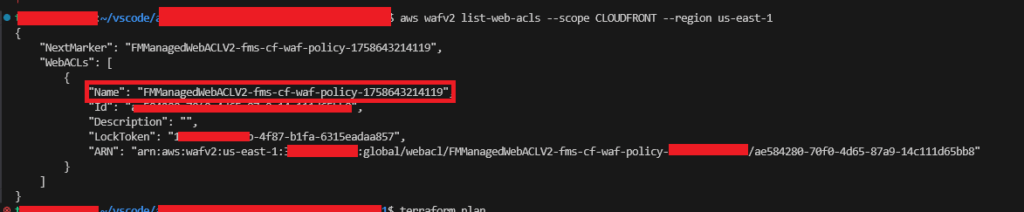
In our example it is: FMManagedWebACLV2-fms-cf-waf-policy-1758643214119, names start with FMManagedWebACLV2-<policy-name>-<timestamp>; because it is CloudFront the scope is global, i.e. us-east-1.
Step 2 – Adopt the WebACL to CloudFront Distribution
In the workload account’s Terraform, read that ACL via a data source and wire it into your aws_cloudfront_distribution.web_acl_id (which expects the ARN, not the ID). The “data” will require you to enter the policy name (not ARN), i.e. FMManagedWebACLV2-<policy-name>-<timestamp>, but then it uses this to discover the ARN, which in this used within the CloudFront.
We obtained this value in the previous step, so we’ll then add to the relevant Terraform template containing our AWS CloudFront definition the following:
...

// AWS CloudFront Distribution - AWS Firewall Manager Deployed WAF (WebACL) ---------------------------------------------------------------------------------
# The CloudFront distribution is subject to AWS Firewall Manager policy (or policies), therefore these need to be discovered and "adopted" to the configuration to avoid
# being seen as "drift".

data "aws_wafv2_web_acl" "fms_acl" {
  provider = aws.useast1
  name  = "FMManagedWebACLV2-fms-cf-waf-policy-1758643214119"
  scope = "CLOUDFRONT"
}

// AWS CloudFront Distribution ------------------------------------------------------------------------------------------------------------------------------

# Create an AWS CloudFront distribution
resource "aws_cloudfront_distribution" "simple-cf" {
  ... your existing distribution config ...

  # Adopt the association so Terraform doesn't try to remove it
  web_acl_id = data.aws_wafv2_web_acl.fms_acl.arn

  # Optional: if FMS might rotate the ACL (new ARN), avoid drift
  #lifecycle {
  #  ignore_changes = [web_acl_id]
  #}

  ... your existing distribution config ...
}

...
Regions and their Impact
You’ll notice that on the data resource above aws_wafv2_web_acl, that we’ve added a provider = aws.useast1, this is because without this the Terraform will default to whatever your current region is. If it is not us-east-1 then it will be attempting to find a resource in the wrong region, therefore the following is required in your providers.tf file (alongside your existing “provider” definition – if not us-east-1):
...
provider "aws" {
  alias   = "useast1"
  region  = "us-east-1"
  profile = "ids-imt-sandbox"
}
...
If you fail to deal with this you’ll see an error like: Error: list WAFv2 WebACLs: operation error WAFV2: ListWebACLs, https response error StatusCode: 400, RequestID: 9c3cfaeb-dd9e-455f-a2a0-c1469cb7d689, WAFInvalidParameterException: Error reason: The scope is not valid., field: SCOPE_VALUE, parameter: CLOUDFRONT

Step 3 – Verify WebACL is Adopted
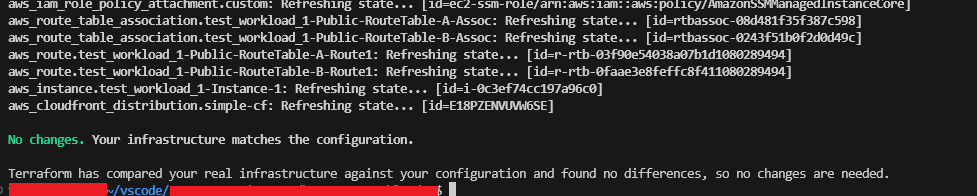
Verifying if the WebACL is as simple as running a “terraform plan”, assuming you have no outstanding changes, you should see the “No changes. Your infrastructure matches the configuration” output, which shows that the WebACL has been successfully adopted.
Resolution (Another Way)
If you prefer not to reference the ACL at all:
resource "aws_cloudfront_distribution" "this" {
  # ... your existing distribution config ...

  lifecycle {
    # Leave association entirely to FMS
    ignore_changes = [web_acl_id]
  }
}
This stops Terraform from trying to disassociate the FMS-applied ACL during plan/apply (useful when FMS might replace ACLs). There’s even an open provider issue discussing drift with FMS-managed associations.