
The MLAG (Multi Link Aggregation Group) allows two or more links to be bonded together to form a single virtual link, even when that is spread across two Leaf Switches. Fundamentally the approach for this is exactly the same as is the case with Extreme Networks, Cisco etc. only the syntax is slightly different.
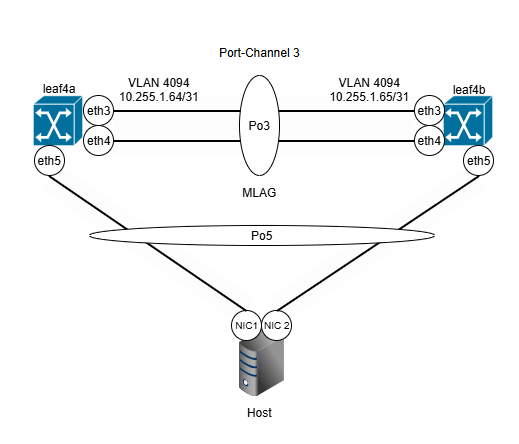
Its a simple example where the two switches: leaf4a and leaf4b are connected together on ethernet 3 and ethernet 4 in a Port-Channel. Then an example host is connected up with a port channel to leaf4a and leaf4b Leaf Switches, however on the Leaf Switch side this is represented as an MLAG. So, from the host side it just sees a bonded connection between NIC1 and NIC2, but this at the Leaf switch side is an MLAG. So the loss of a link or the loss of a Leaf Switch does not affect connectivity to the host.
Its also worth noting that there needs to be a dedicated ISL (ISC) Inter-Switch-Link (Inter-Switch-Connection) VLAN tagged between the two Leaf Switches, each with an IP address configured at each end, so that the MLAG telemetry may take place between the two member switches of the MLAG.
Git Repository: https://github.com/tristanhself/arista-networks-useful-patterns/tree/main/mlag
Example Configuration
Example MLAG cluster configuration, coupled with the presentation of a VLAN 200 to a connected host (untagged, i.e. native) via two MLAG ports ethernet5 within Port-Channel 5. The configuration given below is just an excerpt, some configuration is omitted for brevity and clarity.
A Side Leaf Switch (leaf4a)
vlan 200
   name TESTVLAN1

vlan 4094
   name MLAG
   trunk group MLAG

interface Vlan4094
   description MLAG
   mtu 1500
   no autostate
   ip address 10.255.1.64/31

mlag configuration
   domain-id L3_LEAF4
   local-interface Vlan4094
   peer-address 10.255.1.65
   peer-link Port-Channel3
   reload-delay mlag 300
   reload-delay non-mlag 330

interface Port-Channel3
   description MLAG_leaf4b
   switchport mode trunk
   switchport trunk group MLAG

interface Port-Channel5
   description SERVER-PC9-BOND1
   switchport trunk native vlan 200
   switchport mode trunk
   mlag 5
   spanning-tree portfast edge

interface Ethernet3
   description MLAG-leaf4b-eth3
   channel-group 3 mode active

interface Ethernet4
   description MLAG-leaf4b-eth4
   channel-group 3 mode active

interface Ethernet5
   description SERVER-PC9-NIC1
   channel-group 5 mode active
B Side Leaf Switch (leaf4b)
vlan 200
   name TESTVLAN1

vlan 4094
   name MLAG
   trunk group MLAG

interface Vlan4094
   description MLAG
   mtu 1500
   no autostate
   ip address 10.255.1.65/31

mlag configuration
   domain-id L3_LEAF4
   local-interface Vlan4094
   peer-address 10.255.1.64
   peer-link Port-Channel3
   reload-delay mlag 300
   reload-delay non-mlag 330

interface Port-Channel3
   description MLAG_leaf4a
   switchport mode trunk
   switchport trunk group MLAG

interface Port-Channel5
   description SERVER-PC9-BOND1
   switchport trunk native vlan 200
   switchport mode trunk
   mlag 5
   spanning-tree portfast edge

interface Ethernet3
   description MLAG-leaf4a-eth3
   channel-group 3 mode active

interface Ethernet4
   description MLAG-leaf4a-eth4
   channel-group 3 mode active

interface Ethernet5
   description SERVER-PC9-NIC2
   channel-group 5 mode active
Configuration Deep-Dive
Stepping through each part of the configuration in turn to explain.
We firstly have the VLAN 200 definition which creates the VLAN on the switch.
We then have the VLAN 4094 definition which creates the VLAN which will be used by the MLAG for the inter-switch communication. Its a member of the trunk group MLAG which we’ll come onto shortly.
We then have the definition of the VLAN 4094 IP interface which specifies the IP address of this particular MLAG member, 10.255.1.64 or 10.255.1.65 in this case. These IPs are crucial, they are used for the MLAG cluster to communicate between each other to maintain state and switch traffic correctly to any member ports of the MLAG.
We then have the actual MLAG configuration that specifies the domain-id, a name for the MLAG pair, both members of the MLAG must have the same domain-id, “L3_LEAF4” in this example. The “local-interface” sets which VLAN/interface is being used for the communication between each side of the MLAG, i.e. between the peers.
Here you also see the peer address, i.e. the IP address of the other side of the MLAG cluster. We also specify the Port-Channel 3 to denote which is the ISL to be used for this communication.
We then have all the interface configurations, in this case Port-Channel 3 is a LAG/Ether-Channel/Port-Channel that consists of two ports Ethernet3 and Ethernet4.
Then we have Port-Channel 5 which in this example is the MLAG used by Ethernet5 on leaf4a and leaf4b to be where the test Host is connected up to.
We also see on this Port-Channel 5 configuration, that “mlag 5” is specified that gives this MLAG an ID. Its strongly recommended to use the same MLAG ID as the ethernet number to make support simpler and easier to identify the member ports.
Conclusion
An interesting thing to notice is that unlike with Extreme Networks XOS, you don’t need to tag the user-facing VLANs across the ISL (inter-switch-link), the MLAG configuration does this for you. All you need to do is create the VLAN and then tag/add it to the edge ports and the MLAG configuration will ensure it is present on the ISL for you.