
A BGP Confederation, is like Route Reflectors another technique to remove the need for the “full-mesh” requirement of iBGP, where such a requirement is prohibitive, due to the size of the network. Remember that with an iBGP AS network, each Router must have a BGP Neighbour (peering) with every other for the AS to operate correctly, sure this is fine when you have like 3 or 5 routers, but when you have say 50, you’d need so many BGP Neighbour configurations (peerings) it would get prohibitively complicated and resource consuming to continue.
The use of BGP Confederations can get around these issues, and put in a nutshell, BGP Confederations are sub-Autonomous Systems (AS), i.e. sub-ASs; it allows you to split up an AS into multiple sub-ASs that are more manageable than attempting to manage at the AS level alone. It reduces the need for the number of BGP Neighbours (peerings) that need to be configured and therefore the complexity of it.
Within a sub-AS (Confederation) there still needs to be a full-mesh configured, however this might only be 3 or 5 or 10 routers, not say 50, meaning the number of BGP Neighbour peering configurations required is therefore substantially lower, and therefore easier to configure and manage in the long run. Within a sub-AS the routers use iBGP, but they treat routers in other sub-AS as if they are eBGP peers, HOWEVER, they are still using iBGP for these peering, the use of Sub-AS (BGP Confederations) does not change that, even though it changes the behaviour to be more eBGP like.
To a different AS (entirely) an AS which is using BGP Confederations still looks the same as a normal AS, therefore preserving the way eBGP works between AS.
Tidy-Up
We now need to tidy up some the lab from the previous articles, we need to remove the BGP configurations from Router A, Router B, Router G and Router E that relate to the local-AS BGP Neighbours (peers). The peers to the other AS (Green), we don’t need to worry about, these can remain for now. So essentially, once the removal of the configuration is complete, Router A for example would look something like:
configure bgp AS-number 65001
configure bgp routerid 1.1.1.1
configure bgp add network 10.1.0.0/24
create bgp neighbor 192.168.100.10 remote-AS-number 65002
configure bgp neighbor 192.168.100.10 source-interface ipaddress 192.168.100.9
enable bgp neighbor 192.168.100.10
configure bgp neighbor 192.168.100.10 send-community both
enable bgp
i.e. just the BGP Neighbour peer to the other AS Green (65002).
Topology
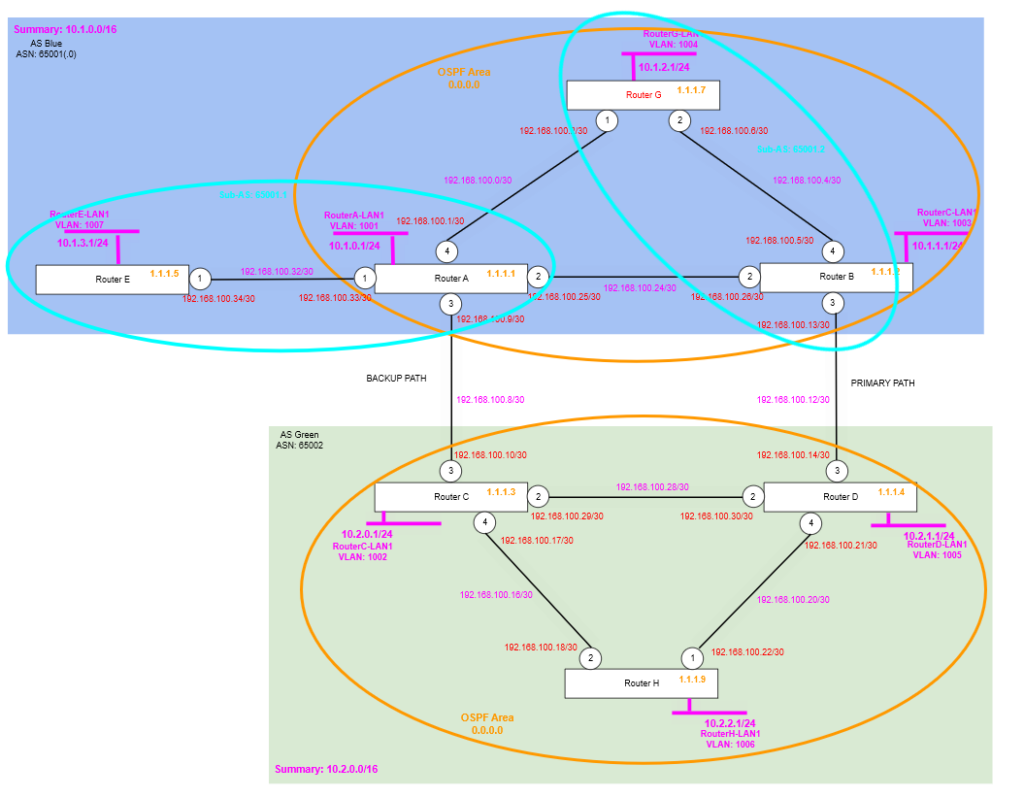
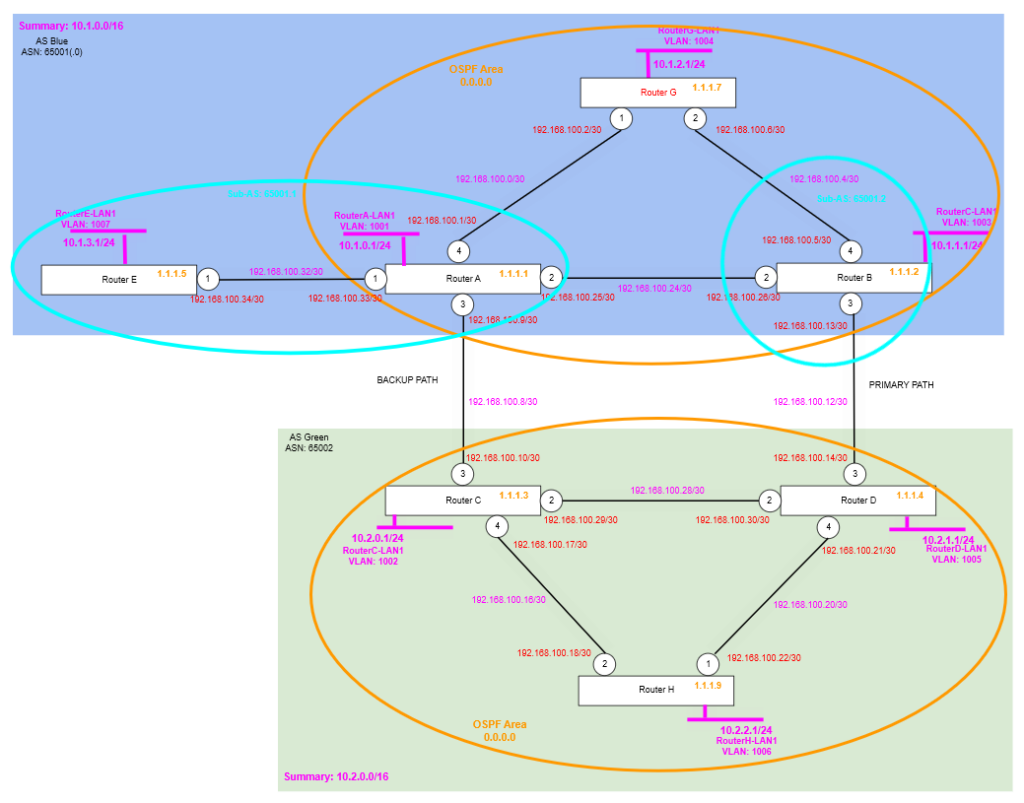
We’re going to be creating two sub-AS within the AS Blue 65001 autonomous system, so essentially the AS Blue 65001 will become a BGP Confederation, with a two member sub-AS. The AS will still be numbered 65001 (but could be considered to be 65001.0), for the purposes of our example we’re going to be referring to the AS as 65001 and the sub-AS as 65001.1 and 65001.2 respectively. The rest of the environment will be the same.
BGP Confederation
We are having two sub-AS within the AS Blue (65001), one consisting of Router A and Router E, the other consisting of Router B and Router G, as per the circled areas on the diagram above.
Due to the limitations of our test lab, we haven’t got 3 routers (or more) within one sub-AS, if we were to do so, we’d need this to follow the rules of the iBGP, i.e. having a full-mesh between all the routers within the (sub-)AS. In our case each sub-AS will only have 2 routers within it, but it being two routers, means that they are fully-meshed.
Where a router in one sub-AS is connected to a router in another sub-AS there is specific configuration required on that BGP Neighbour peering configuration to ensure that the BGP Confederation configuration knows that router is in another sub-AS, even though its in the same AS, and therefore doesn’t treat it as if it’s a normal iBGP router.
We are now changing the AS Blue ASN number from 65001 to 65001.0, helps us note that its now having sub-AS within it, but from what I can tell this is not essential.
So, AS Blue 65001.0 is now being split (using BGP Confederation) into two sub-AS with ASNs 65001.1 and 65001.2 respectively.
Taking Router A as an example:
- ASN is changed to the ASN of the confederation, changed from: 65001 to 65001.1
- Confederation ID is added and set to the original ASN number: 65001.0
Taking Router E as an example, which is within the same Sub-AS as Router A:
- ASN is changed to the ASN of the confederation, changed from: 65001 to 65001.1
- Confederation ID is added and set to the original ASN number: 65001.0
Taking Router B as an example, which is within the second sub-AS:
- ASN is changed to the ASN of the confederation, changed from: 65001 to 65001.2
- Confederation ID is added and set to the original ASN number: 65001.0
Finally taking Router G as an example, which is within the same Sub-AS as Router B:
- ASN is changed to the ASN of the confederation, changed from: 65001 to 65001.2
- Confederation ID is added and set to the original ASN number: 65001.0
You need to add the: configure bgp as-display-format asdot so that the BGP AS Numbers show up in a more intelligible form. Otherwise, the dotted notation e.g. 65001.0 would be turned into its AS Decimal format: 4259905537 when looking at it within the configuration.
Implement the sub-AS Individually
We’re first implementing each of the two sub-AS individually, well then go on to join these together so that the whole AS works as one, but utilising the two sub-AS (BGP Confederations) within it.
Router A
Set the Confederation ID to the AS Number. Set the AS-Number to the sub-AS number, create the neighbour to the other router within the sub-AS. Note we are leaving the configuration for the peering to the other AS, i.e. AS Green (65002) alone.
configure bgp as-display-format asdot

configure bgp confederation-id 65001.0

configure bgp AS-number 65001.1

create bgp neighbor 1.1.1.5 remote-AS-number 65001.1
configure bgp neighbor 1.1.1.5 source-interface ipaddress 1.1.1.1
enable bgp neighbor 1.1.1.5
Router E
Set the Confederation ID to the AS Number. Set the AS-Number to the sub-AS number, create the neighbour to the other router within the sub-AS.
configure bgp as-display-format asdot

configure bgp confederation-id 65001.0

configure bgp AS-number 65001.1

create bgp neighbor 1.1.1.1 remote-AS-number 65001.1
configure bgp neighbor 1.1.1.1 source-interface ipaddress 1.1.1.5
enable bgp neighbor 1.1.1.1
Router B
Set the Confederation ID to the AS Number. Set the AS-Number to the sub-AS number, create the neighbour to the other router within the sub-AS. Note we are leaving the configuration for the peering to the other AS, i.e. AS Green (65002) alone.
configure bgp as-display-format asdot

configure bgp confederation-id 65001.0

configure bgp AS-number 65001.2

create bgp neighbor 1.1.1.7 remote-AS-number 65001.2
configure bgp neighbor 1.1.1.7 source-interface ipaddress 1.1.1.2
enable bgp neighbor 1.1.1.7
Router G
Set the Confederation ID to the AS Number. Set the AS-Number to the sub-AS number, create the neighbour to the other router within the sub-AS.
configure bgp as-display-format asdot

configure bgp confederation-id 65001.0

configure bgp AS-number 65001.2

create bgp neighbor 1.1.1.2 remote-AS-number 65001.2
configure bgp neighbor 1.1.1.2 source-interface ipaddress 1.1.1.7
enable bgp neighbor 1.1.1.2
Verify
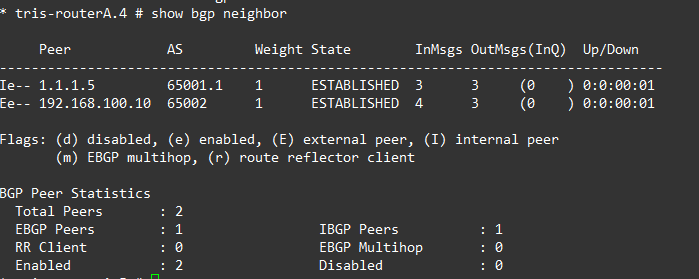
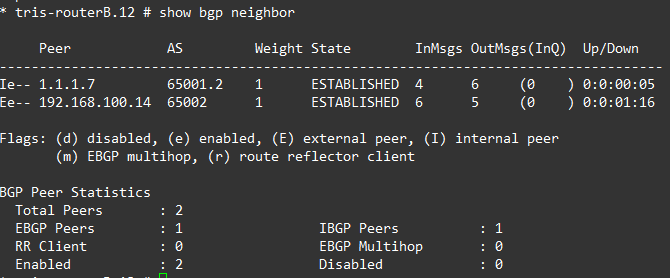
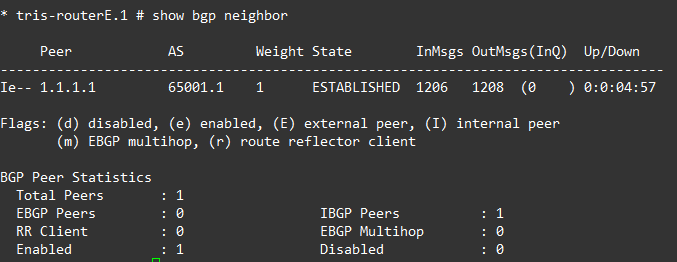
If we now check the BGP Neighbour (peers) on each of the 4 routers, we see the following established neighbours.
But, this is not yet functional, there is more to do! For example, if we were to check the route table of Router E, we’d see that we are only seeing Router A’s LAN and no Router B or Router G’s LAN network routes show, this because we’ve not yet fully configured the BGP Confederation, so each sub-AS is essentially acting like its own island of routing.

Peer the sub-AS Together – Confederation Peers
To get everything fully configured, we have one last step and that is to establish the peers between the two sub-AS. Looking at the topology, sub-AS 65001.1 will interface to sub-AS 65001.2 via Router A only, with two links, one to Router B and one to Router G. So let’s go through the configuration we need to add onto each of the routers.
As you can see, we are now just adding the BGP Neighbour peering as you would expect, but there is an additional command that sets a “Confederation Peer”, i.e. specifies that remote sub-AS is (65001.2) is within the same Confederation as the current sub-AS (65001.2). Remember no configuration is required on Router E, because it has no direct links (peerings) to Router B or E.
Issue with Configuration
When attempting to add the BGP Neighbour peering between sub-AS, for example on Router A attempting to add the BGP Neighbour peering to Router B, which is in the other sub-AS, the following issue was observed, saying “Error: EBGP Peer 1.1.1.2 is not directly connected”.

If trying locally to create the neighbour in the same sub-AS (obviously this wouldn’t work, it was to prove the issue), it worked fine.

As per this article: https://extreme-networks.my.site.com/ExtrArticleDetail?an=000092266, it appears that the use of the sub-AS causes the router to think there is another hop, this requiring you to use “multi-hop” configuration when defining a BGP Neighbour that crosses between a sub-AS within a BGP Confederation, otherwise you’ll get this error message when attempting to create the BGP Neighbour.
Router A
Add the two BGP Neighbours, specifying now the AS Number as the sub-AS Number instead, and specifying the confederation peer configuration.
configure bgp add confederation-peer sub-AS-number 65001.2

create bgp neighbor 1.1.1.2 remote-AS-number 65001.2 multi-hop
configure bgp neighbor 1.1.1.2 source-interface ipaddress 1.1.1.1
enable bgp neighbor 1.1.1.2

create bgp neighbor 1.1.1.7 remote-AS-number 65001.2 multi-hop
configure bgp neighbor 1.1.1.7 source-interface ipaddress 1.1.1.1
enable bgp neighbor 1.1.1.7
Router B
Add the one BGP Neighbour, specifying now the AS Number as the sub-AS Number instead, and specifying the confederation peer configuration. Remember the link between Router B and G is within the sub-AS, so was already created earlier.
configure bgp add confederation-peer sub-AS-number 65001.1

create bgp neighbor 1.1.1.1 remote-AS-number 65001.1 multi-hop
configure bgp neighbor 1.1.1.1 source-interface ipaddress 1.1.1.2
enable bgp neighbor 1.1.1.1
Router G
Add the one BGP Neighbour, specifying now the AS Number as the sub-AS Number instead, and specifying the confederation peer configuration. Remember the link between Router B and G is within the sub-AS, so was already created earlier.
configure bgp add confederation-peer sub-AS-number 65001.1

create bgp neighbor 1.1.1.1 remote-AS-number 65001.1 multi-hop
configure bgp neighbor 1.1.1.1 source-interface ipaddress 1.1.1.7
enable bgp neighbor 1.1.1.1
Verify
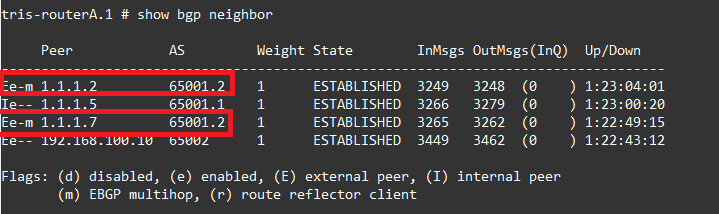
Now we have things configured, let’s have a look at the BGP Neighbours and routes, firstly if we examine Router A’s BGP Neighbours (peers), we can see the two peering to Router B and Router G show a different sub-AS number: 65001.2 instead of 65001.1. We can also see the “m” showing it is an EBGP multihop. So all looks good there.
Fixing the BGP Neighbour Peering(s) to AS Green (65002)
We swapped the AS Number from 65001 to 65001.0, this has broken the two links from AS Blue to AS Green, so to fix them, we need to update Router C and Router D’s BGP Neighbour configuration to use this updated AS Number.
You need to add the: configure bgp as-display-format asdot so that the BGP AS Numbers show up in a more intelligible form. Otherwise, the dotted notation e.g. 65001.0 would be turned into its AS Decimal format: 4259905537 when looking at it within the configuration.
Router C
We delete then recreate the BGP Neighbour to Router A in the other AS, i.e. AS Blue 65001.0.
configure bgp as-display-format asdot

delete bgp neighbor 192.168.100.9

create bgp neighbor 192.168.100.9 remote-AS-number 65001.0
configure bgp neighbor 192.168.100.9 source-interface ipaddress 192.168.100.10
enable bgp neighbor 192.168.100.9
Router D
We delete then recreate the BGP Neighbour to Router A in the other AS, i.e. AS Blue 65001.0.
configure bgp as-display-format asdot

delete bgp neighbor 192.168.100.13

create bgp neighbor 192.168.100.13 remote-AS-number 65001.0
configure bgp neighbor 192.168.100.13 source-interface ipaddress 192.168.100.14
enable bgp neighbor 192.168.100.13
Verify Operation
Now we’re all done with our configuration, let’s examine what this has done with the routing tables. Firstly if we inspect Router A’s BGP route table, we can see a number of interesting things.

The routes highlighted in red are those learned by Router A from Router B and Router G, which are in the other sub-AS, so now we see an AS-Path value with the sub-AS number 65001.2, notice it is in brackets, this means it has been learnt from within the same AS (i.e. the same BGP Confederation), but from a different sub-AS to which Router A is in.
The second interesting thing is the route highlighted in green. This route has been learnt from Router E, which is in the same sub-AS as Router A, therefore there is no AS-Path shown, and everything is you would normally see for an iBGP peer.
The final interesting thing is the routes highlighted in blue, which are being learnt from the other AS, i.e. from AS Green 65002, so the 10.2.0.0/16 routes. Because Router A has its own direct link (peering) to Router C you can see these are the routes which have the AS-Path 65002. We can then see the same route but coming via Router B instead, with this one we can see an AS-Path which includes ( 65001.2 ) and 65002, showing it has learned this route from the same AS, but a different sub-AS via the BGP Confederation.
Router Not Participating in BGP Confederation
You may have a situation where a Router (or Routers) within an AS are not part of the BGP Confederation, although not a typical configuration, it is possible to do this, you can have one or more Routers that are present within the AS, but not within the BGP Confederation, i.e. not within one of the sub-AS; therefore a Non-Confederation Router.
However, an important note is that the Router(s) that is/are outside the BGP Confederation must have at least one BGP Neighbour (peering) to at least one Router within each sub-AS, otherwise routes will not be distributed properly between this Non-Confederation Router and the other sub-AS within the BGP Confederation.
However, for completeness, we’ve tried this, the topology below shows what this would look like. In this case Router A and E are part of sub-AS 65001.1, then Router B is now on its own inside the sub-AS 65001.2, finally Router G is outside just within the AS.
The configuration of this is a bit strange, take note of the configuration on Router G, here we remove all the BGP Confederation configuration, so as far as Router G is concerned the BGP peers are just within the same AS as it is, it has no consideration that there is a BGP Confederation present. The other Routers: Router A and Router B now have the remote-AS on each BGP Neighbour configuration set to the AS number too.
Remove Configuration
Router G
We first remove the BGP Confederation configuration from Router G, we want this Router to be the one that is not within the BGP Confederation, but it is still within the AS (which contains the BGP Confederation sub-ASs 65001.1 and 65001.2).
disable bgp
delete bgp neighbour 1.1.1.1
delete bgp neighbour 1.1.1.2

configure bgp delete confederation-peer sub-AS-number 65001.1

configure bgp confederation-id 0

configure bgp AS-number 65001.0
Remove and Re-Add Configuration
Router G
We now recreate the BGP Neighbour (peerings), but here’s where it gets a bit odd, from the point of view of Router G we specify the AS number, not that Router’s sub-AS (BGP Confederation ID). I.e. rather than putting in 65001.1 and 65001.2 of Router A and Router B respectively as you might think, you instead set the BGP Neighbour with the remote-AS of the AS that the sub-AS exist in, and that hasn’t changed from 65001!
create bgp neighbor 1.1.1.1 remote-AS-number 65001.0
configure bgp neighbor 1.1.1.1 source-interface ipaddress 1.1.1.7
enable bgp neighbor 1.1.1.1

create bgp neighbor 1.1.1.2 remote-AS-number 65001.0
configure bgp neighbor 1.1.1.2 source-interface ipaddress 1.1.1.7
enable bgp neighbor 1.1.1.2
Router A
On router A, it is now just as simple as removing the BGP Neighbour to Router G, and recreating it, but this time not specifying 65001.2 which was when it was a member of the sub-AS, we now just put in the AS number.
delete bgp neighbor 1.1.1.7

create bgp neighbor 1.1.1.7 remote-AS-number 65001.0 multi-hop
configure bgp neighbor 1.1.1.7 source-interface ipaddress 1.1.1.1
enable bgp neighbor 1.1.1.7
Router B
On router B it is now just as simple as removing the BGP Neighbour to Router G, and recreating it, but this time not specifying 65001.2 which was when it was a member of the sub-AS, we now just put in the AS number.
delete bgp neighbor 1.1.1.7

create bgp neighbor 1.1.1.7 remote-AS-number 65001.0 multi-hop
configure bgp neighbor 1.1.1.7 source-interface ipaddress 1.1.1.2
enable bgp neighbor 1.1.1.7
Verify
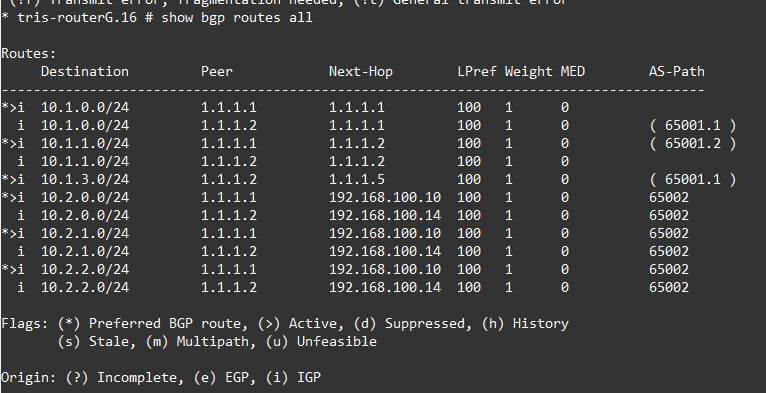
So now what do we see if we inspect the Route Table on Router G? Well, all looks pretty much as we’d expect, however if you examine the 10.1.0.0/24 LAN network, which originates from Router A, we can see one of the routes has an AS-Path and the other does not. This is because the route showing an AS-Path has come via an intermediate sub-AS. Sure Router A is in a sub-AS too, but Router G considers anything it’s directly connected to as within the same AS, even if it’s in a sub-AS.
You can see how this behaviour relates to what we did in the previous section where we took Router G out of a sub-AS, and that in doing so we must ensure that Router G has a direct peering to at least one Router within each AS. So from its point of view, it’s just seeing it as the same AS.
Conclusion
A slightly more involved configuration in this article that explored how BGP Confederations work. A BGP Confederation is a useful way to subdivide a large AS down into more manageable chunks and also remove the need for a full-mesh of BGP Neighbours between all the routers which becomes increasingly difficult to manage as you add more routers to a particular AS.