
In this article, we’re going to examine another mechanism of BGP, BGP Communities. These like MED are used to change/influence/direct how traffic will flow between different AS. Its just another mechanism like MED you could use, but has some advantages when compared to MED, namely it can be much more dictatorial rather than influencial and this is important.
BGP Communities is a 32-bit tag that you attach to a route: <ASN>:<value> (e.g. 65001:100), they are in essence a label which is sent to the BGP Neighbour (peer), a neigbouring AS where the administrators of both Autonomous Systems have agreed some common meaning for these “communtities”, i.e. labels.
If you compare this with MED. MED attempts to influence behaviour “please prefer this path”, while BGP Communities say: “Apply this policy to this route”.
So, the System Administrators of each AS will have agreed and typically have published a set of BGP Community values (labels) and what those will then do. So it becomes easy for the System Administrator of one AS to direct another AS’s infrastructure to perform in a particular way based upon an agreed set of pre-determined rules. They can just say: I need you to prefer this path over this path, look up within the rulebook which BGP Community label (value) is needed to get that particular outcome and then set this value accordingly.
You could summerise these mechanisms as: MED is send and hope, while BGP Communities is set X and get behaviour Y.
Worked Example
Like the previous two articles, we want to ensure that traffic that is ingressing into AS Blue (65001) from AS Green (65002) via the “PRIMARY PATH” and only use the “BACKUP PATH” if the primary was to be unavailable. We’ll use BGP Communities to achieve this behaviour, and we’ll be using the same topology as the previous article.

BGP Communties Rulebook
We’ll need a BGP Communities Rulebook so the AS Blue (65001) System Administrator knows what BGP Community values (strings/labels) to send to AS Green (65002) when advertising the routes so that they (i.e. the AS Blue System Administrator) can get the desired behaviour from the AS Green (65002) network.
Here’s another key point, the AS Green System Administrator must have configured their routers with policies too, they need BGP policies applied (to the BGP Neighbour peering to AS Blue) that have the Rulebook codified in them so that their network behaves the way it has been agreed to do so.
So, if you (AS Blue) send us (AS Green) the BGP Community value of 1, then we’ll (AS Green) set a Local Preference of 100 (more favourable) on the route to your (AS Blue) network, and if you (AS Blue) send the BGP Community value of 2, then we’ll (AS Green) set a Local Preference of 50 (less faviourable) on the route to your (AS Blue) network. And with that mechanism you (AS Blue) can tell us (AS Green) which of your two links you’d prefer for us (AS Green) to ingress (send) traffic into your (AS Blue) network (AS) along.
| Community (Label) | Meaning (in AS Blue 65002) | Outcome |
|---|---|---|
| 65002:1 | Set LocalPref to 100 | Prefer this path. |
| 65002:2 | Set LocalPref to 50 | Don’t prefer this path. |
Remember with Local Preference (LocalPref/LPref), the higher the value the more prefered the path.
Also remember when you’re sending the destination’s AS Number first, with the BGP Community value (label) appended.
| Note that within this example we’re doing it very one-sidedly. Of course in the real world, it’s likely all this would be taken care of by something like what we are configuring with BGP Communities, it’s not one-sided, AS Green (65002) will likely have the same sort of requirement to prefer a particular path over another, and so may well be using similar mechanisms to influence and control the preferred paths. This is where the communications between the AS System Administrators is important to ensure that everyone is agreed, and not implementing policies that are in conflict with each other! |
BGP Communities Configuration
We’re going to be configuring the BGP Community configuration across the Routers A, B, C and D.
- We want Router A to be sending a BGP Community value of 65002:2, so that Router C will set the Local Preference to 50, therefore making it the “BACKUP PATH”.
- We want Router B to be sending a BGP Community value of 65002:1,so that Router D will set the Local Preference to 100, therefore making it the “PRIMARY PATH”.
- We want Router C to have a policy so that when it receives a BGP Community label of “65002:2” it sets the Local Preference of that route to 50, thus making it less desirable (than the path via Router B ↔ Router D).
- We want Router D to have a policy so that when it receives a BGP Community label of “65002:1” it sets the Local Preference of that route to 100, thus making it more desirable.
Essentially, codifying what is in our rulebook.
The Extreme Networks website has information on exactly how these policies can be used: https://documentation.extremenetworks.com/exos_32.7.1/GUID-7EF7D0E6-0777-40A2-B2F7-F6F906EA2D39.shtml and https://extreme-networks.my.site.com/ExtrArticleDetail?an=000120646 and https://extreme-networks.my.site.com/ExtrArticleDetail?an=000079504.
Important Note on BGP Community Representation
The BGP Community value is in the form: <ASN>:<value> (e.g. 65002:2), however although within the policy it is represented as this form, the as per RFC 1997 (and RFC 8195) Extreme Networks XOS switch converts this to a 32bit binary string when it is actually added to the BGP routes that are sent. A BGP Large Community, allows for an additional value, i.e. <ASN>:<Function>:<Parameter>, but that is not of our concern at the moment.
So taking the example BGP Community of 65002:2, then converting it, we get the following.
- 65002 is 1111110111101010
- 2 is 0000000000000010
Therefore, 65002:2 which is represented as: 11111101111010100000000000000010 is 4259971074
We don’t need to enter this value within our BACKUPROUTE-OUT and PRIMARYROUTE-OUT policies, but we do need it in our BACKUPROUTE-IN and PRIMARYROUTE-IN policies for it to match successfully, but we’ll come onto this later.
Router A
Add the following policy with: edit policy BACKUPROUTE-OUT, then add the below policy directive to set a BGP Community of “2”. Note: we are not adding a separate catch-all block.
entry set-community {
  if match all {
    nlri 10.1.0.0/16;
  } then {
	community set "65002:2";
	permit;
  }
}
Then apply the policy to the BGP Neighbour (peer) with:
check policy BACKUPROUTE-OUT
configure bgp neighbor 192.168.100.10 route-policy out BACKUPROUTE-OUT
configure bgp neighbor 192.168.100.10 send-community standard
refresh policy BACKUPROUTE-OUT
Now the routes to Router C are being sent with a BGP Community value of “2”.
Verify
Let’s just verify that, we can run a: show bgp neighbor 192.168.100.10 transmitted-routes detail all, to see 1. that the routes are actually being sent, and 2. that the routes are being transmitted with the BGP Community added.

And as we can see yes, they are being transmitted, and we can also see the BGP Community is being added: 4259971074, this value being the one that we’ll need to inspect and act upon on Router C, so let’s check Router C.

And yes we can see this is successfully receiving the routes, along with the BGP Community, so now we just need to configure the policy to use this on Router C accordingly, we’ll come to that shortly.
Router B
Add the following policy with: edit policy PRIMARYROUTE-OUT, then add the below policy directive to set a BGP Community of “1”. Note: we are not adding a separate catch-all block.
Remember we are sending a “1” because we want this to be considered the PRIMARY path/route by the other AS.
entry set-community {
  if match all {
    nlri 10.1.0.0/16;
  } then {
	community set "65002:1";
	permit;
  }
}
Then apply the policy to the BGP Neighbour (peer) with:
check policy PRIMARYROUTE-OUT
configure bgp neighbor 192.168.100.14 route-policy out PRIMARYROUTE-OUT
configure bgp neighbor 192.168.100.14 send-community standard
refresh policy PRIMARYROUTE-OUT
Now the routes to Router D are being sent with a BGP Community value of “1”.
Verify
We quickly verify and yes, we are getting a different BGP Community value, so that looks good.

Router C
On this Router (within AS Green 65002), we now need to add a policy that interprets this BGP Community value and applies a suitable weighting accordingly. Add the following policy with: edit policy BACKUPROUTE-IN, then add the below policy directive. Note: we are not adding a separate catch-all block.
Remember that we are adding the BGP Community in the 32-bit form, not the <AS>:<value> notation. Hence:
- 65002:1 => 4259971073 (Binary: 11111101111010100000000000000001)
- 65002:2 => 4259971074 (Binary: 11111101111010100000000000000010)
entry BACKUPROUTE-IN-1 {
if {
    community "4259971073" ;
}
then {
    local-preference 100 ;
	permit ;
}
}
entry BACKUPROUTE-IN-2 {
if {
    community "4259971074" ;
}
then {
    local-preference 50 ;
	permit ;
}
}
Then apply the policy to the BGP Neighbour (peer) with the following, notice we are applying on “IN”, i.e. the routes coming in from Router A.
check policy BACKUPROUTE-IN
configure bgp neighbor 192.168.100.9 route-policy in BACKUPROUTE-IN
refresh policy BACKUPROUTE-IN
Verify
Just check the BGP Community is being interpreted correctly, and therefore the Local Preference being updated accordingly, which it is, the routes received from Router A (i.e. the BACKUP ROUTE) are correctly being assigned a lower Local Preference as we want.

Router D
On this Router (within AS Green 65002), we now need to add a policy that interprets this BGP Community value and applies a suitable weighting accordingly. Add the following policy with: edit policy PRIMARYROUTE-IN, then add the below policy directive. Note: we are not adding a separate catch-all block.
Remember that we are adding the BGP Community in the 32-bit form, not the <AS>:<value> notation. Hence:
- 65002:1 => 4259971073 (Binary: 11111101111010100000000000000001)
- 65002:2 => 4259971074 (Binary: 11111101111010100000000000000010)
entry PRIMARYROUTE-IN-1 {
if {
    community "4259971073" ;
}
then {
    local-preference 100 ;
	permit ;
}
}
entry PRIMARYROUTE-IN-2 {
if {
    community "4259971074" ;
}
then {
    local-preference 50 ;
	permit ;
}
}
Then apply the policy to the BGP Neighbour (peer) with the following, notice we are applying on “IN”, i.e. the routes coming in from Router B.
check policy PRIMARYROUTE-IN
configure bgp neighbor 192.168.100.13 route-policy in PRIMARYROUTE-IN
refresh policy PRIMARYROUTE-IN
Verify
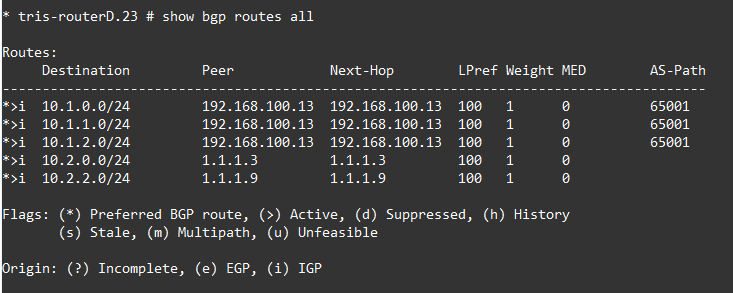
Verify what the status is, as we can see the routes are showing up, and the Local Preference is 100, although that is the default, but either way, the Router B ↔ Router D link becomes the PRIMARY for traffic that is ingressing into AS Blue (65001) from AS Green (65002) which is what we want.
Local Preference Configuration
We want to ensure that traffic egressing from AS Blue (65001) to AS Green (65002) goes out via the “PRIMARY PATH” (Router B ↔ Router D), just as much as the traffic (returning) from AS Green (65002) ingresses into AS Blue (65001) via the “PRIMARY PATH”, as in the previous articles to ensure symmetric routing, we just need to set the Local Preference within AS Blue (65001) to make sure the traffic egressing goes the way we want too! That being, we want traffic to go via the Router B ↔ Router D link (PRIMARY), rather than via the Router A ↔ Router C (BACKUP).
In reality what you may well do is essentially the same thing we’ve configured above, but in reverse where we’re setting the route preferences based on what the other AS is telling us through BGP Community as one technique. But to save time and keep things simple, we’ll just apply the Local Preference on the routes within AS Blue (65001) to ensure the traffic egresses via the PRIMARY link, the same link as we’re directing with the BGP Community for the traffic ingressing from AS Blue (65002).
Router A
Create a policy with: edit policy BACKUPROUTE-IN, then we apply it to ensure the routes being sent from AS Green (65002) to AS Blue (65001) to manipulate the Local Preference to make the BACKUP PATH a less desirable path/route.
entry BACKUPROUTE-IN {
if match all {
    nlri 10.2.0.0/16 ;
}
then {
    local-preference 50 ;
    permit  ;
}
}
Then apply it to the BGP Neighbour (peer) configuration between Router A and Router C.
configure bgp neighbor 192.168.100.10 route-policy in BACKUPROUTE-INRouter B
Create a policy with: edit policy PRIMARYROUTE-IN, then we apply it to ensure the routes being sent from AS Green (65002) to AS Blue (65001) to manipulate the Local Preference to make the BACKUP PATH a less desirable path/route.
entry PRIMARYROUTE-IN {
if match all {
    nlri 10.2.0.0/16 ;
}
then {
    local-preference 100 ;
    permit  ;
}
}
Then apply it to the BGP Neighbour (peer) configuration between Router A and Router C.
configure bgp neighbor 192.168.100.14 route-policy in PRIMARYROUTE-INVerify Behaviour
Now we can verify the behaviour of the configuration, in normal operation, the “PRIMARY PATH” is where the traffic goes normally based on the BGP Communities configured, thus meeting our desired traffic flow paths. And then we can test what happens when the “PRIMARY PATH” then fails.
Normal Operation
If we check the BGP Routes on Router G and Router H, we should see them both using the Router B ↔ Router D link/path, which as we can see they are, using 192.168.100.14 and 192.168.100.13 respectively.


If we now check the routes on Router C and Router D, we can see that the policy, the BGP Community and the Local Preference are doing their work as we want. The Router A ↔ Router C path is less desirable than the Router B ↔ Router D path.


A traceroute in both directions from Router G’s LAN network and Router H’s LAN network, will also demonstrate the correct path is being taken, in both directions, i.e. the routing is symmetrical.


Failure of “PRIMARY PATH”
Now everything appears to be in order, let’s try a failure scenario, that being our primary path fails (Router B ↔ Router D), and examine how that affects the path taken between Router G and Router H.
The traceroute result between Router G’s LAN and Router H’s LAN now shows the following path through the network, as you can see it is differing from the above.


Extreme Networks EXOS also has a cheeky argument for the ping command that helps you show the change of route during a ping running, and additionally the return path, which can be helpful.
* tris-routerG.4 # ping count 100 10.2.2.1 from 10.1.2.1 with record-route
Ping(ICMP) 10.2.2.1: 100 packets, 8 data bytes, interval 1 second(s).
16 bytes from 10.2.2.1: icmp_seq=0 ttl=62 time=12 ms
RR: 10.1.2.1
    192.168.100.13
    192.168.100.21
    10.2.2.1
    10.2.2.1
    192.168.100.14
    192.168.100.5
    10.1.2.1

...
16 bytes from 10.2.2.1: icmp_seq=67 ttl=62 time=5.466 ms
    (same route)
16 bytes from 10.2.2.1: icmp_seq=68 ttl=62 time=29 ms
...
84 bytes from 192.168.100.5: icmp_seq=86 Destination Net Unreachable
16 bytes from 10.2.2.1: icmp_seq=87 ttl=62 time=9.121 ms
RR: 10.1.2.1
    192.168.100.9
    192.168.100.17
    10.2.2.1
    10.2.2.1
    192.168.100.10
    192.168.100.1
    10.1.2.1

16 bytes from 10.2.2.1: icmp_seq=88 ttl=62 time=11 ms
    (same route)
16 bytes from 10.2.2.1: icmp_seq=89 ttl=62 time=4.808 ms
We now bring back up the failed primary path, and we can watch the routes return to “normal”, where the Router B ↔ Router D path is now the active one.
Conclusion
Within this article we have seen how BGP Communities can be used to instruct other networks to operate in terms of data ingressing or egressing to and from your network (AS). BGP Communities require System Administrators to agree on common approaches and configuration, so that the System Administrator of an AS can use pre-determined/agreed rules to obtain specific behaviour out of another System Administrator’s network (AS).
In this article, we wanted to ensure that the Router A ↔ Router C link was used as backup and the Router B ↔ Router D link was used as the primary, using BGP Communities we were able to influence how AS Green (65002) ingressed traffic to the AS Blue (65001) by use of a BGP Communities sent by AS Blue (65001) to AS Green (65002), with policies that “dovetailed” and took action with AS Green (65002) based on values received within the BGP Community values.